'비트교육 > WEB' 카테고리의 다른 글
| [41일차] Java Spring Boot (0) | 2022.08.18 |
|---|---|
| [40일차] spring boot demo project (0) | 2022.08.17 |
| [40일차] logback (0) | 2022.08.17 |
| [40일차] 게시판 만들기(3) delete. update 추가 🌀 최종 게시판 만들기 (0) | 2022.08.17 |
| [39일차] 게시판 만들기 (2) (0) | 2022.08.16 |
| [41일차] Java Spring Boot (0) | 2022.08.18 |
|---|---|
| [40일차] spring boot demo project (0) | 2022.08.17 |
| [40일차] logback (0) | 2022.08.17 |
| [40일차] 게시판 만들기(3) delete. update 추가 🌀 최종 게시판 만들기 (0) | 2022.08.17 |
| [39일차] 게시판 만들기 (2) (0) | 2022.08.16 |
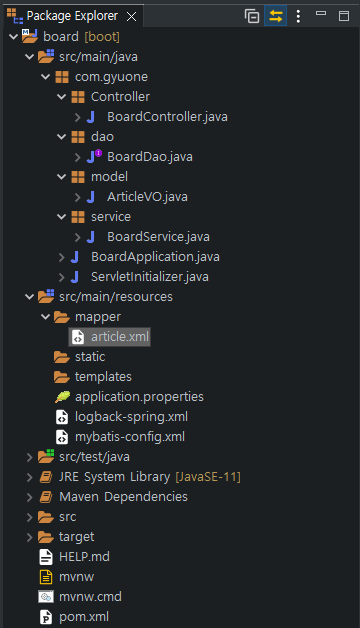
starter Project select

logback-spring.xml 만들기
<?xml version="1.0" encoding="UTF-8"?>
<configuration>
	<property name="LOG_PATH" value="E:/tmp/logs" />

	<appender name="STDOUT"
		class="ch.qos.logback.core.ConsoleAppender">
		<target>System.out</target>
		<encoder>
			<pattern>[%d{yyyy-MM-dd HH:mm:ss}:%-3relative][%thread] [%-5level]
				%logger{35} - %msg%n</pattern>
		</encoder>
	</appender>
	<appender name="ROLLING"
		class="ch.qos.logback.core.rolling.RollingFileAppender">
		<file>${LOG_PATH}/logback.log</file>
		<append>true</append>
		<encoder
			class="ch.qos.logback.classic.encoder.PatternLayoutEncoder">
			<pattern>[%d{yyyy-MM-dd HH:mm:ss}:%-3relative][%thread] [%-5level]
				%logger{35} - %msg%n</pattern>
		</encoder>
		<filter class="ch.qos.logback.classic.filter.ThresholdFilter">
			<level>INFO</level>
		</filter>
		<rollingPolicy
			class="ch.qos.logback.core.rolling.SizeAndTimeBasedRollingPolicy">
			<fileNamePattern>${LOG_PATH}/logback.%d{yyyy-MM-dd}.%i.log.zip
			</fileNamePattern>
			<maxFileSize>5MB</maxFileSize>
			<maxHistory>30</maxHistory>
		</rollingPolicy> <!-- 롤링 정책 30일 분량의 로그 파일은 유지가 되고 30일 이전의 로그 파일은 삭제-->
	</appender>


	<root level="debug">
		<appender-ref ref="ROLLING" />
		<appender-ref ref="STDOUT" />
	</root>
</configuration>
WEB-INF 폴더랑 view 폴더 만들기

application.properties
#Server
server.port=8090
server.servlet.session.timeout=36000

#Spring MVC
spring.mvc.view.prefix=/WEB-INF/view/
spring.mvc.view.suffix=.jsp

#Database config
spring.datasource.url=jdbc:mysql://localhost:3306/board?useUnicode=true;characterEncoding=utf8;
spring.datasource.username=gyuwon
spring.datasource.password=1234
spring.datasource.driverClassName=com.mysql.cj.jdbc.Driver


#Mybatis config
mybatis.config-location=classpath:mybatis-config.xml

#Mybatis mapper
mybatis.mapper-locations=classpath:mapper/article.xml

#Package for using alias in mapper
mybatis.type-aliases-package=com.gyuone.model
article.xml 이클립스 mapper 그대로 복사
mapper 부분 바꾸기
article.xml
<?xml version="1.0" encoding="UTF-8"?>
<!DOCTYPE mapper PUBLIC "-//mybatis.org//DTD Mapper 3.0//EN"
"http://mybatis.org/dtd/mybatis-3-mapper.dtd">

<mapper namespace="com.gyuone.dao.BoardDao">
	<resultMap type="articleVO" id="articleResult">
		<result property="articleNo" column="ArticleNo" />
		<result property="title" column="Title" />
		<result property="contents" column="Contents" />
		<result property="writeDate" column="WriteDate" />
		<result property="writeId" column="WriteID" />
	</resultMap>
	<select id="selectAllArticles" resultMap="articleResult">
		<![CDATA[
			select * from noticeboard order by WriteDate desc
		]]>
	</select>
	<select id="selectArticle" resultType="articleVO"
		parameterType="int">
		<![CDATA[
			select * from noticeboard where ArticleNo = #{articleNo}
		]]>
	</select>
	<insert id="insertArticle" parameterType="articleVO">
		<![CDATA[
			insert into noticeboard (Title, Contents, WriteDate, WriteID)
			values (#{title}, #{contents}, default, #{writeId})
		]]>
	</insert>
	<update id="updateArticle" parameterType="articleVO">
		<![CDATA[
			update noticeboard set Title=#{title}, Contents=#{contents}, WriteDate=default
			where ArticleNo=#{articleNo}
		]]>
	</update>
	<delete id="deleteArticle" parameterType="int">
		delete from noticeboard
		where ArticleNo=#{articleNo}
	</delete>
</mapper>

BoardDao.java
package com.gyuone.dao;

import java.util.List;

import org.apache.ibatis.annotations.Mapper;
import org.springframework.dao.DataAccessException;
import org.springframework.stereotype.Repository;

import com.gyuone.model.ArticleVO;

@Mapper
@Repository("boardDao")
public interface BoardDao { // 인터페이스 추상메서드
	// 이클립스에서 mapper와 동일하게 작동 spring이 알아서 찾아감
	public List<ArticleVO> selectAllArticles() throws DataAccessException;
	public ArticleVO selectArticle(int articleNo) throws DataAccessException;
	public void insertArticle(ArticleVO article) throws DataAccessException;
	public void updateArticle(ArticleVO article) throws DataAccessException;
	public void deleteArticle(int articleNo) throws DataAccessException;

}
jsp파일 아니구 Thymeleaf 사용해서 쓴다.
1. Thymeleaf -> 미니 프로젝트에서 사용해 볼 것.
2. ORM(JPA)
3. 인증 - 인터셉터, 세션 / Spring Security
4. 부트스트랩
https://ko.javascript.info/async-await
async와 await
ko.javascript.info
시각화
자료를 웹 스프링 부트 애플리케이션
리눅스에 wap
그래프에 데이터베이스
스크린 캡쳐 static 리소스로 넘겨서 보이게
데이터베이스 집어 넣어서 시각화
차트 js 차트 라이브러리
https://github.com/GyuWonLee/SpringBoard
GitHub - GyuWonLee/SpringBoard
Contribute to GyuWonLee/SpringBoard development by creating an account on GitHub.
github.com
| [42일차] Spring 시험 (0) | 2022.08.19 |
|---|---|
| [40일차] spring boot demo project (0) | 2022.08.17 |
| [40일차] logback (0) | 2022.08.17 |
| [40일차] 게시판 만들기(3) delete. update 추가 🌀 최종 게시판 만들기 (0) | 2022.08.17 |
| [39일차] 게시판 만들기 (2) (0) | 2022.08.16 |
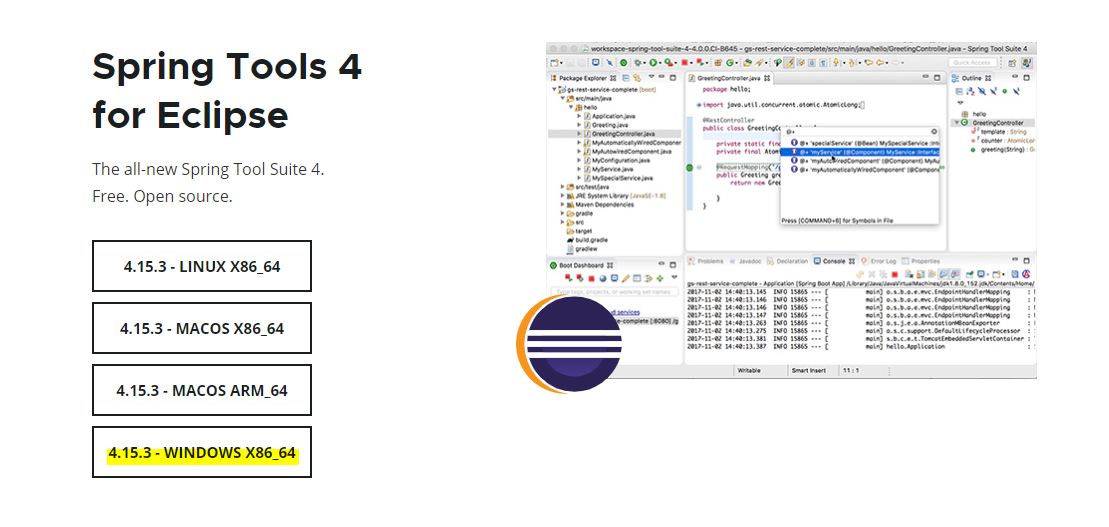
Spring Tools 4 is the next generation of Spring tooling
Largely rebuilt from scratch, Spring Tools 4 provides world-class support for developing Spring-based enterprise applications, whether you prefer Eclipse, Visual Studio Code, or Theia IDE.
spring.io


com.gyuone
└controller
└DemoController.java
package com.gyuone.controller;

import org.springframework.stereotype.Controller;
import org.springframework.ui.Model;
import org.springframework.web.bind.annotation.RequestMapping;
import org.springframework.web.bind.annotation.ResponseBody;

@Controller
public class DemoController { // 상위 패키지 밑으로 자동으로 들어가기
	@ResponseBody
	@RequestMapping("/")
	public String home() {
		return "Hello boot!!!";
	}

	@RequestMapping("/hello")
	public String hello(Model model) {
		model.addAttribute("message", "hello.jsp 입니다.");
		return "hello";
	}
}
└DemoApplication.java
package com.gyuone;

import org.springframework.boot.SpringApplication;
import org.springframework.boot.autoconfigure.SpringBootApplication;

@SpringBootApplication
public class DemoApplication {

	public static void main(String[] args) {
		SpringApplication.run(DemoApplication.class, args);
	}

}
└SevletInitializer.java
package com.gyuone;

import org.springframework.boot.builder.SpringApplicationBuilder;
import org.springframework.boot.web.servlet.support.SpringBootServletInitializer;

public class ServletInitializer extends SpringBootServletInitializer {

	@Override
	protected SpringApplicationBuilder configure(SpringApplicationBuilder application) {
		return application.sources(DemoApplication.class);
	}

}
└staitc
└image
└love.png
└js
└script.js
function test(){
	alert("JSP 테스트");
}
└view
└hello.jsp
<%@ page language="java" contentType="text/html; charset=UTF-8"
	pageEncoding="UTF-8"%>
<%@ taglib prefix="c" uri="http://java.sun.com/jsp/jstl/core"%>
<c:set var="contextPath" value="${pageContext.request.contextPath}" />
<%
	request.setCharacterEncoding("UTF-8"); // 자바 소스 코드사용
%>
<!DOCTYPE html>
<html>
<head>
<script src="${contextPath}/js/script.js"></script>
<meta charset="utf-8">
<title>hello.jsp 페이지</title>
</head>
<body>
	안녕하세요 <br>
  <h2>${message}</h2>
  <img width=200 height=600 src="${contextPath}/image/love.png" /> <br/>
  <input type="button" name="테스트" value="테스트" onClick="test();">
</body>
</html>

└pom.xml
<?xml version="1.0" encoding="UTF-8"?>
<project xmlns="http://maven.apache.org/POM/4.0.0"
	xmlns:xsi="http://www.w3.org/2001/XMLSchema-instance"
	xsi:schemaLocation="http://maven.apache.org/POM/4.0.0 https://maven.apache.org/xsd/maven-4.0.0.xsd">
	<modelVersion>4.0.0</modelVersion>
	<parent>
		<groupId>org.springframework.boot</groupId>
		<artifactId>spring-boot-starter-parent</artifactId>
		<version>2.7.2</version>
		<relativePath /> <!-- lookup parent from repository -->
	</parent>
	<groupId>com.gyuone</groupId>
	<artifactId>demo</artifactId>
	<version>0.0.1-SNAPSHOT</version>
	<packaging>war</packaging>
	<name>demo</name>
	<description>Demo project for Spring Boot</description>
	<properties>
		<java.version>11</java.version>
	</properties>
	<dependencies>
		<dependency>
			<groupId>org.springframework.boot</groupId>
			<artifactId>spring-boot-starter-web</artifactId>
		</dependency>

		<dependency>
			<groupId>org.springframework.boot</groupId>
			<artifactId>spring-boot-starter-tomcat</artifactId>
			<scope>provided</scope>
		</dependency>
		<dependency>
			<groupId>org.springframework.boot</groupId>
			<artifactId>spring-boot-starter-test</artifactId>
			<scope>test</scope>
		</dependency>
		<dependency>
			<groupId>javax.servlet</groupId>
			<artifactId>jstl</artifactId>
		</dependency>
		<dependency>
			<groupId>org.apache.tomcat.embed</groupId>
			<artifactId>tomcat-embed-jasper</artifactId>
			<scope>provided</scope>
		</dependency>
	</dependencies>
	<build>
		<plugins>
			<plugin>
				<groupId>org.springframework.boot</groupId>
				<artifactId>spring-boot-maven-plugin</artifactId>
			</plugin>
		</plugins>
	</build>

</project>
자체 내장된 톰캣 설정
| [42일차] Spring 시험 (0) | 2022.08.19 |
|---|---|
| [41일차] Java Spring Boot (0) | 2022.08.18 |
| [40일차] logback (0) | 2022.08.17 |
| [40일차] 게시판 만들기(3) delete. update 추가 🌀 최종 게시판 만들기 (0) | 2022.08.17 |
| [39일차] 게시판 만들기 (2) (0) | 2022.08.16 |

로그를 실제 작성한 사람이 WARN ERROR 레벨로 찍겠다. 디버그는 디버깅할 때 많이 쓴다.
로그를 찍어야겠다 할 때 level을 정할 수 있다. 어디까지 찍을지는 선택할 수 있다.
ERROR 치명적인 에러를 찍는다. 경고성 WARN을 찍는다. 원하는 대로 찍을 수 있다.
/
[Layout]
%m : 로그내용이 출력
%p : trace > debug > info > warn > error 등의 priority 출력
%r : 어플리케이션이 시작되어 로깅이벤트가 발생하는 시점까지의 경과시간을 밀리세컨드로 출력
%c : 예) 카테고리가 a.b.c 처럼 되어있다면 %c{2}는 b.c가 출력됩니다.
%n : 플랫폼 종속적인 개행문자가 출력된다. \r\n 또는 \n 일것이다
%d : 로깅이벤트가 일어나 날짜 출력 ( 프로그램의 실행속도를 느리게 한다.)
예) %d{HH:mm:ss} 또는 %d{dd MMMM yyyy HH:mm:ss}
%C : 호출자의 클래스명 출력
예) 클래스구조가 org.apache.xyz.SomeClass 처럼 되어있다면 %C{2}는 xyz.SomeClass 가 출력됩니다
%M : 로깅이 발생한 method 이름을 나타냅니다.
%F : 로깅이 발생한 프로그램 파일명을 나타냅니다.
%l : 로깅이 발생한 caller의 정보를 나타냅니다
%L : 로깅이 발생한 caller의 라인수를 나타냅니다
%x : 로깅이 발생한 thread와 관련된 NDC(nested diagnostic context)를 출력합니다.
%X : 로깅이 발생한 thread와 관련된 MDC(mapped diagnostic context)를 출력합니다.
%% : % 표시를 출력하기 위해 사용한다.
%t : 로그이벤트가 발생된 쓰레드의 이름을 출력합니다
maven update 하기

실행시키면 E:/tmp/logs안에 logback.log 로그파일이 생긴다.


RestSvcController

[네트워크] REST API란? REST, RESTful이란?
REST API란 REST를 기반으로 만들어진 API를 의미합니다. REST API를 알기 위해 REST부터 알아보도록 하겠습니다. REST란? REST(Representational State Transfer)의 약자로 자원을 이름으로 구분하여 해당 자원..
khj93.tistory.com

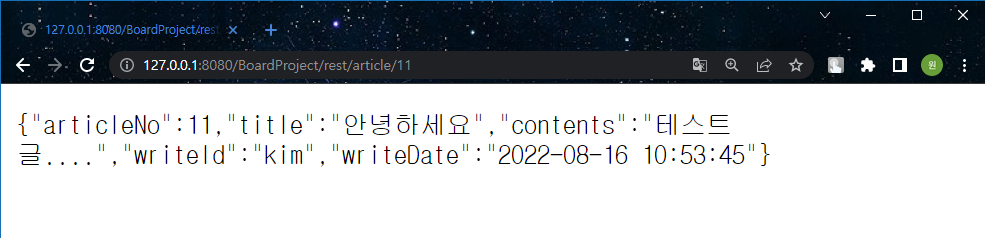


한 두개 쓰려면 ResopnseBody로 .. 안되면 Controller 사용하기
| [41일차] Java Spring Boot (0) | 2022.08.18 |
|---|---|
| [40일차] spring boot demo project (0) | 2022.08.17 |
| [40일차] 게시판 만들기(3) delete. update 추가 🌀 최종 게시판 만들기 (0) | 2022.08.17 |
| [39일차] 게시판 만들기 (2) (0) | 2022.08.16 |
| [38일차] 게시판 만들기 (0) | 2022.08.12 |
녹화_2022_08_17_17_21_58_185.mp4
4.44MB
https://github.com/GyuWonLee/FinalBoardProject
GitHub - GyuWonLee/FinalBoardProject
Contribute to GyuWonLee/FinalBoardProject development by creating an account on GitHub.
github.com

com.gyuone
└ config
└ ControllerConfig.java
package com.gyuone.config;

import org.springframework.context.annotation.Bean;
import org.springframework.context.annotation.ComponentScan;
import org.springframework.context.annotation.Configuration;

import com.gyuone.controller.BoardController;
import com.gyuone.controller.RestSvcController;
import com.gyuone.dao.BoardDao;
import com.gyuone.model.ArticleVO;
import com.gyuone.service.BoardService;

@Configuration
@ComponentScan(basePackages= {"com.gyuone.config, com.gyuone.service"})
public class ControllerConfig {
	@Bean
	public ArticleVO articleVO() {
		return new ArticleVO();
	}

	@Bean
	public BoardDao boardDao() {
		return new BoardDao();
	}

//	@Bean
//	public BoardService boardService() {
//		return new BoardService();
//	}

	@Bean
	public BoardController boardController() {
		return new BoardController();
	}

	@Bean
	RestSvcController restSvcController() {
		return new RestSvcController();
	}
}
└ MvcConfig.java
package com.gyuone.config;

import org.springframework.context.annotation.Configuration;
import org.springframework.web.servlet.config.annotation.DefaultServletHandlerConfigurer;
import org.springframework.web.servlet.config.annotation.EnableWebMvc;
import org.springframework.web.servlet.config.annotation.ViewResolverRegistry;
import org.springframework.web.servlet.config.annotation.WebMvcConfigurer;

@Configuration
@EnableWebMvc
public class MvcConfig implements WebMvcConfigurer{

	@Override
	public void configureDefaultServletHandling(DefaultServletHandlerConfigurer configurer) {
		// TODO Auto-generated method stub
		configurer.enable();
	}

	@Override
	public void configureViewResolvers(ViewResolverRegistry registry) {
		// TODO Auto-generated method stub
		registry.jsp("/WEB-INF/view/", ".jsp"); // .jsp를 알아서 붙여라.
	}


}
└ controller
└ BoardController.java
package com.gyuone.controller;

import java.util.ArrayList;
import java.util.List;

import org.slf4j.Logger;
import org.slf4j.LoggerFactory;
import org.springframework.beans.factory.annotation.Autowired;
import org.springframework.stereotype.Controller;
import org.springframework.ui.Model;
import org.springframework.web.bind.annotation.RequestMapping;
import org.springframework.web.bind.annotation.RequestMethod;
import org.springframework.web.bind.annotation.RequestParam;
import org.springframework.web.bind.annotation.ResponseBody;
import org.springframework.web.servlet.ModelAndView;
import org.springframework.web.servlet.mvc.support.RedirectAttributes;

import com.gyuone.model.ArticleVO;
import com.gyuone.service.BoardService;

@Controller
@RequestMapping("/board") // board를 다 받음
public class BoardController {
	@Autowired
	BoardService boardService;
	@Autowired
	ArticleVO articleVo;

	List<ArticleVO> articleList = new ArrayList<ArticleVO>();

	Logger logger = LoggerFactory.getLogger("com.gyuone.controller.BoardController");

	@RequestMapping({"/listArticles","/"}) // 배열로 때림
	public String getArticleList(Model model) {
		logger.info("===============> getArticleList 메서드 진입");
		articleList = boardService.listArticles();
		model.addAttribute("articleList", articleList);
		return "listArticles";
	}

	@RequestMapping("/mlist")
	@ResponseBody
	public List<ArticleVO> getArticleListForMobile() {
		articleList = boardService.listArticles();
		return articleList;
	}


	@RequestMapping("/newArticle")
	public String writeArticle(Model model) {
		return "articleForm";

	}

	@RequestMapping(value="/addArticle", method=RequestMethod.POST)
	public String addArticle(Model model, @RequestParam(value="title") String title,
			@RequestParam(value="content") String content) {
		articleVo.setTitle(title);
		articleVo.setContents(content);
		articleVo.setWriteId("bit");
		boardService.addArticle(articleVo);

		return "redirect:listArticles"; // client ---> server addArticle로 들어온거.
		// server----> client 요청한거 다 끝냈으니깐 listArticles로 더 불러줄래? ---> listArticles로 다시 불러줌.
	}

	@RequestMapping(value="/viewArticle", method=RequestMethod.GET)
	public ModelAndView viewArticle(@RequestParam(value="articleno") String articleNo) {
		articleVo = boardService.viewArticle(Integer.parseInt(articleNo));
		ModelAndView mv = new ModelAndView();
		mv.setViewName("viewArticle");
		mv.addObject("article", articleVo);

		return mv;
	}

	@RequestMapping(value="/editArticle", method=RequestMethod.POST)
	public String editArticle(@RequestParam(value="articleNo") String articleNo,
			@RequestParam(value="title") String title, @RequestParam(value="content") String content,
			RedirectAttributes redirect) {
		articleVo.setArticleNo(Integer.parseInt(articleNo));
		articleVo.setTitle(title);
		articleVo.setContents(content);
		articleVo.setWriteId("bit");
		boardService.editArticle(articleVo);

		redirect.addAttribute("articleno", articleNo);
		return "redirect:viewArticle";
	}

	@RequestMapping(value="/removeArticle", method=RequestMethod.POST)
	public String removeArticle(@RequestParam(value="articleNo") String articleNo) {
		boardService.removeArticle(Integer.parseInt(articleNo));
		return "redirect:listArticles";
	}
}
└ RestSvcController.java
package com.gyuone.controller;

import org.slf4j.Logger;
import org.slf4j.LoggerFactory;
import org.springframework.beans.factory.annotation.Autowired;
import org.springframework.web.bind.annotation.PathVariable;
import org.springframework.web.bind.annotation.RequestMapping;
import org.springframework.web.bind.annotation.RequestMethod;
import org.springframework.web.bind.annotation.RestController;

import com.gyuone.model.ArticleVO;
import com.gyuone.service.BoardService;

@RestController
@RequestMapping("/rest")
public class RestSvcController {
	@Autowired
	ArticleVO articleVo;
	@Autowired
	BoardService boardService;

	Logger logger = LoggerFactory.getLogger("com.gyuone.controller.RestSvcController");

	@RequestMapping("/hello")
	public String hello() {
		logger.info("====> hello() 진입");
		return "Hello REST!!!!";
	}

	@RequestMapping(value="/article/{num}", method=RequestMethod.GET)
	public ArticleVO getArticle(@PathVariable("num") int articleNo) { // num 변수
		articleVo = boardService.viewArticle(articleNo); // articleVo 통째로 넘겨버림
		return articleVo;
	}

}
└ dao
└ BoardDao.java
package com.gyuone.dao;

import java.io.Reader;
import java.util.List;

import org.apache.ibatis.io.Resources;
import org.apache.ibatis.session.SqlSession;
import org.apache.ibatis.session.SqlSessionFactory;
import org.apache.ibatis.session.SqlSessionFactoryBuilder;

import com.gyuone.model.ArticleVO;

public class BoardDao {
	private static SqlSessionFactory sessionFactory = null;

	public static SqlSessionFactory getInstance() {
		if(sessionFactory == null) {
			try {
				String resource = "mybatis-config.xml";
				Reader reader = Resources.getResourceAsReader(resource);
				sessionFactory = new SqlSessionFactoryBuilder().build(reader);
				reader.close();
			} catch (Exception e) {
				// TODO: handle exception
				e.printStackTrace();
			}
		}
		return sessionFactory;
	}

	public List<ArticleVO> selectAllArticles() {
		sessionFactory = getInstance();
		SqlSession session = sessionFactory.openSession();
		List<ArticleVO> articleList = session.selectList("mapper.article.selectAllArticles"); // 리스트 타입으로 던져준다.
		session.close();
		return articleList;
	}

	public void insertNewArticle(ArticleVO article) {
		sessionFactory = getInstance();
		SqlSession session = sessionFactory.openSession();
		session.insert("mapper.article.insertArticle", article);
		session.commit();
//		session.close(); commit을 때리면 알아서 해주기 때문에 close 안해도 된다.
	}

	public ArticleVO selectArticle(int articleNo) {
		sessionFactory = getInstance();
		SqlSession session = sessionFactory.openSession();
		ArticleVO article;
		article = session.selectOne("mapper.article.selectArticle", articleNo);
		session.close();
		return article;
	}

	public void updateArticle(ArticleVO article) {
		sessionFactory = getInstance();
		SqlSession session = sessionFactory.openSession();
		session.update("mapper.article.updateArticle", article);
		session.commit();
	}

	public void deleteArticle(int articleNo) {
		sessionFactory = getInstance();
		SqlSession session = sessionFactory.openSession();
		session.delete("mapper.article.deleteArticle", articleNo);
		session.commit();
	}


}
└ model
└ ArticleVO.java
package com.gyuone.model;

public class ArticleVO {
	private int articleNo;
	private String title;
	private String contents;
	private String writeId;
	private String writeDate;

	public ArticleVO() { // value object

	}

	public ArticleVO(int articleNo, String title, String contents, String writeID) {
		super();
		this.articleNo = articleNo;
		this.title = title;
		this.contents = contents;
		this.writeId = writeID; // date는 default라 뺀다.
	}

	public int getArticleNo() {
		return articleNo;
	}

	public void setArticleNo(int articleNo) {
		this.articleNo = articleNo;
	}

	public String getTitle() {
		return title;
	}

	public void setTitle(String title) {
		this.title = title;
	}

	public String getContents() {
		return contents;
	}

	public void setContents(String contents) {
		this.contents = contents;
	}

	public String getWriteId() {
		return writeId;
	}

	public void setWriteId(String writeId) {
		this.writeId = writeId;
	}

	public String getWriteDate() {
		return writeDate;
	}

	public void setWriteDate(String writeDate) {
		this.writeDate = writeDate;
	}


}
└ service
└ BoardService.java
package com.gyuone.service;

import java.util.List;

import org.springframework.beans.factory.annotation.Autowired;
import org.springframework.stereotype.Service;

import com.gyuone.dao.BoardDao;
import com.gyuone.model.ArticleVO;

@Service
public class BoardService {
	@Autowired
	BoardDao boardDao;

	public List<ArticleVO> listArticles() {
		List<ArticleVO> articleList = boardDao.selectAllArticles();
		return articleList;
	}

	public void addArticle(ArticleVO article) {
		boardDao.insertNewArticle(article);
	}

	public ArticleVO viewArticle(int articleNo) {
		ArticleVO article;
		article = boardDao.selectArticle(articleNo);
		return article;
	}

	public void editArticle(ArticleVO article) {
		boardDao.updateArticle(article);
	}

	public void removeArticle(int articleNo) {
		boardDao.deleteArticle(articleNo);
	}

}
src/resources
└ article-mapper.xml
<?xml version="1.0" encoding="UTF-8"?>
<!DOCTYPE mapper PUBLIC "-//mybatis.org//DTD Mapper 3.0//EN"
"http://mybatis.org/dtd/mybatis-3-mapper.dtd">

<mapper namespace="mapper.article">
	<resultMap type="articleVO" id="articleResult">
		<result property="articleNo" column="ArticleNo" />
		<result property="title" column="Title" />
		<result property="contents" column="Contents" />
		<result property="writeDate" column="WriteDate" />
		<result property="writeId" column="WriteID" />
	</resultMap>
	<select id="selectAllArticles" resultMap="articleResult">
		<![CDATA[
			select * from noticeboard order by WriteDate desc
		]]>
	</select>
	<select id="selectArticle" resultType="articleVO" parameterType="int">
		<![CDATA[
			select * from noticeboard where ArticleNo = #{articleNo}
		]]>
	</select>
	<insert id="insertArticle" parameterType="articleVO">
		<![CDATA[
			insert into noticeboard (Title, Contents, WriteDate, WriteID)
			values (#{title}, #{contents}, default, #{writeId})
		]]>
	</insert>
	<update id="updateArticle" parameterType="articleVO">
		<![CDATA[
			update noticeboard set Title=#{title}, Contents=#{contents}, WriteDate=default
			where ArticleNo=#{articleNo}
		]]>
	</update>
	<delete id="deleteArticle" parameterType="int">
		delete from noticeboard where ArticleNo=#{articleNo}
	</delete>
</mapper>
└ logback.xml
<?xml version="1.0" encoding="UTF-8"?>
<configuration>
	<property name="LOG_PATH" value="E:/tmp/logs" />

	<appender name="STDOUT"
		class="ch.qos.logback.core.ConsoleAppender">
		<target>System.out</target>
		<encoder>
			<pattern>[%d{yyyy-MM-dd HH:mm:ss}:%-3relative][%thread] [%-5level]
				%logger{35} - %msg%n</pattern>
		</encoder>
	</appender>
	<appender name="ROLLING"
		class="ch.qos.logback.core.rolling.RollingFileAppender">
		<file>${LOG_PATH}/logback.log</file>
		<append>true</append>
		<encoder
			class="ch.qos.logback.classic.encoder.PatternLayoutEncoder">
			<pattern>[%d{yyyy-MM-dd HH:mm:ss}:%-3relative][%thread] [%-5level]
				%logger{35} - %msg%n</pattern>
		</encoder>
		<filter class="ch.qos.logback.classic.filter.ThresholdFilter">
			<level>INFO</level>
		</filter>
		<rollingPolicy
			class="ch.qos.logback.core.rolling.SizeAndTimeBasedRollingPolicy">
			<fileNamePattern>${LOG_PATH}/logback.%d{yyyy-MM-dd}.%i.log.zip
			</fileNamePattern>
			<maxFileSize>5MB</maxFileSize>
			<maxHistory>30</maxHistory>
		</rollingPolicy> <!-- 롤링 정책 30일 분량의 로그 파일은 유지가 되고 30일 이전의 로그 파일은 삭제-->
	</appender>


	<root level="info">
		<appender-ref ref="ROLLING" />
		<appender-ref ref="STDOUT" />
	</root>
</configuration>
└ mybatis-config.xml
<?xml version="1.0" encoding="UTF-8"?>
<!DOCTYPE configuration PUBLIC "-//mybatis.org//DTD Config 3.0//EN"
"http://mybatis.org/dtd/mybatis-3-config.dtd">
<configuration>
<typeAliases>
<typeAlias type="com.gyuone.model.ArticleVO"
alias="articleVO" />
</typeAliases>
<environments default="dev">
<environment id="dev">
<transactionManager type="JDBC"></transactionManager>
<dataSource type="POOLED">
<property name="driver" value="com.mysql.cj.jdbc.Driver" />
<property name="url"
value="jdbc:mysql://localhost:3306/board?useUnicode=true&characterEncoding=utf8" />
<property name="username" value="gyuwon" />
<property name="password" value="1234" />
</dataSource>
</environment>
</environments>
<mappers>
<mapper resource="article-mapper.xml" />
</mappers>
</configuration>
WEB-INF
└ view
└ articleForm.jsp
<%@ page language="java" contentType="text/html; charset=UTF-8"
	pageEncoding="UTF-8"%>
<%@ taglib prefix="c" uri="http://java.sun.com/jsp/jstl/core"%>
<c:set var="contextPath" value="${pageContext.request.contextPath}" />
<%
	request.setCharacterEncoding("UTF-8"); // 자바 소스 코드사용
%>
<!DOCTYPE html>
<html>
<head>
<meta charset="UTF-8">
<title>글쓰기</title>
<script>
	function backToList(frm) {
		frm.action="${contextPath}/board/listArticles";
		frm.submit();
	}
</script>
<style>
.class-caption {
	width: 100px;
}

.class-content {
	width: 500px;
}

@font-face {
	font-family: 'LeeSeoyun';
	src:
		url('https://cdn.jsdelivr.net/gh/projectnoonnu/noonfonts_2202-2@1.0/LeeSeoyun.woff')
		format('woff');
	font-weight: normal;
	font-style: normal;
}

* {
	font-family: 'LeeSeoyun';
}

input:focus { background-color: #c0d9fc; }
textarea:focus { background-color: #c0d9fc; }


</style>
</head>
<body>
	<h1 style="text-align: center; color:#c0d9fc;">새 글 쓰기</h1>
	<form name="articleForm" method="post" action="${contextPath}/board/addArticle">
		<table boarder="0" align="center">
			<tbody>
				<tr>
					<td align="right" class="class-caption">글제목:</td>
					<td colspan="2">
						<input type="text" maxlength="100" name="title" class="class-content" />
					</td>
				</tr>
				<tr>
					<td align="right" valign="top" class="class-caption"><br>글내용:</td>
					<td colspan="2">
						<textarea name="content" rows="10" maxlength="2000" class="class-content" ></textarea>
					</td>
				</tr>
				<tr>
					<td align="right"></td>
					<td colspan="2">
						<input type="submit" value="글쓰기" />
						<input type="button" value="목록보기" onclick = "backToList(articleForm)" />
					</td>
				</tr>
			</tbody>
		</table>
	</form>
</body>
</html>
└ listArticles.jsp
<%@ page language="java" contentType="text/html; charset=UTF-8"
	pageEncoding="UTF-8"%>
<%@ taglib prefix="c" uri="http://java.sun.com/jsp/jstl/core"%>
<c:set var="contextPath" value="${pageContext.request.contextPath}" />
<%
request.setCharacterEncoding("UTF-8");
%>
<!DOCTYPE html>
<html>
<head>
<meta charset="UTF-8">
<title>글목록</title>
<style>
@font-face {
	font-family: 'LeeSeoyun';
	src:
		url('https://cdn.jsdelivr.net/gh/projectnoonnu/noonfonts_2202-2@1.0/LeeSeoyun.woff')
		format('woff');
	font-weight: normal;
	font-style: normal;
}

* {
	font-family: 'LeeSeoyun';
}

.cls1 {
	text-decoration: none;
}

.cls2 {
	text-align: center;
	font-size: 30px;
	display: block;
}

a:hover {
	color: #153acf;
}

button:hover{
	background-color: #c0d9fc;
}

h1{
  position: relative;
  animation: mymove infinite;
  animation-duration: 3s;
  color: blue;
  animation-fill-mode: forwards;
}

@keyframes mymove {
  from {top: 0px;}
  to {top: 30px; color: #c0d9fc;}
}


/* width */
::-webkit-scrollbar {
	width: 25px;
}

/* Track */
::-webkit-scrollbar-track {
	box-shadow: inset 0 0 3px #c0d9fc;
	border-radius: 5px;
}

/* Handle */
::-webkit-scrollbar-thumb {
	background: #c0d9fc;;
	border-radius: 5px;
}
</style>
</head>
<body>
	<h1 style="text-align: center; color: blue;">글 목록</h1>
	<br><br>
	<table align="center" border="1" width="80%">
		<thead>
			<tr height="10" align="center" bgcolor="#c0d9fc">
				<th>글번호</th>
				<th>작성자</th>
				<th>제목</th>
				<th>작성일</th>
			</tr>
		<thead />
		<c:choose>
			<c:when test="${articleList == null}">
				<tbody>
					<tr height="10">
						<td colspan="4">
							<p align="center">
								<b><span style="font-size: 9pt;">등록된 글이 없습니다.</span></b>
							</p>
						</td>
					</tr>
				</tbody>
			</c:when>
			<c:otherwise>
				<tbody>
					<c:forEach var="article" items="${articleList}"
						varStatus="articleNum">
						<tr align="center">
							<td width="5%">${articleNum.count}</td>
							<td width="10%">${article.writeId}</td>
							<td align="left" width="35%"><span
								style="padding-right: 30px"></span>
								<a class="cls1" href="${contextPath}/board/viewArticle?articleno=${article.articleNo}">
								${article.title}
								</a>
							</td>
							<td width="10%">${article.writeDate}</td>
						</tr>
					</c:forEach>
				</tbody>
			</c:otherwise>
		</c:choose>
	</table>
	<a class="cls1" href="${contextPath}/board/newArticle">
	<br><br>
		<center>
			<button>
				<span class="clas2">글쓰기</span>
			</button>
		</center>
	</a>
</body>
</html>
└ viewArticle.jsp
<%@ page language="java" contentType="text/html; charset=UTF-8"
	pageEncoding="UTF-8"%>
<%@ taglib prefix="c" uri="http://java.sun.com/jsp/jstl/core"%>
<c:set var="contextPath" value="${pageContext.request.contextPath}" />
<%
request.setCharacterEncoding("UTF-8");
%>
<!DOCTYPE html>
<html>
<head>
<meta charset="UTF-8">
<title>글보기</title>
<style type="text/css">
#tr_btn_modify {
	display: none;
}
@font-face {
	font-family: 'LeeSeoyun';
	src:
		url('https://cdn.jsdelivr.net/gh/projectnoonnu/noonfonts_2202-2@1.0/LeeSeoyun.woff')
		format('woff');
	font-weight: normal;
	font-style: normal;
}

* {
	font-family: 'LeeSeoyun';
}

.cls1 {
	text-decoration: none;
}

.cls2 {
	text-align: center;
	font-size: 30px;
	display: block;
}

a:hover {
	color: #153acf;
}

button:hover{
	background-color: #c0d9fc;
}
</style>
<script type="text/javascript">
	function backToList(frm) {
		frm.action="${contextPath}/board/listArticles";
		frm.submit();
	}

	function fn_enable() {
		document.querySelector("#i_title").disabled = false;
		document.querySelector("#i_content").disabled = false;
		document.querySelector("#tr_btn_modify").style.display = "table-row";
		document.querySelector("#tr_btn").style.display = "none";
	}

	function fn_modify_article(frm) {
		frm.action = "${contextPath}/board/editArticle";
		frm.submit();
	}

	/* function fn_remove_article(frm) {
		frm.action = "${contextPath}/board/removeArticle";
		frm.submit();
	} */

	function fn_remove_article(url, articleNo) {
		let form = document.createElement("form");
		form.setAttribute("method", "POST");
		form.setAttribute("action", url);
		let articleNoInput = document.createElement("input");
		articleNoInput.setAttribute("type", "hidden");
		articleNoInput.setAttribute("name", "articleNo");
		articleNoInput.setAttribute("value", articleNo);

		form.appendChild(articleNoInput);
		document.body.appendChild(form);
		form.submit();
	}

</script>
</head>
<body>
<h1 style="text-align: center; color:#c0d9fc;">새 글 쓰기</h1>
	<form name="frmArticle" method="post" action="">
		<table border="0" align="center">
			<tbody>
				<tr>
					<td width="150" align="center" bgcolor="#c0d9fc">글번호</td>
					<td><input name="articleNo" type="text"
						value="${article.articleNo}" disabled /> <input type="hidden"
						name="articleNo" value="${article.articleNo}" /></td>
				</tr>
				<tr>
					<td width="150" align="center" bgcolor="#c0d9fc">작성자ID</td>
					<td><input name="writer" type="text"
						value="${article.writeId}" disabled /></td>
				</tr>
				<tr>
					<td width="150" align="center" bgcolor="#c0d9fc">제목</td>
					<td><input name="title" type="text" value="${article.title}"
						id="i_title" disabled /></td>
				</tr>
				<tr>
					<td width="150" align="center" bgcolor="#c0d9fc">내용</td>
					<td><textarea name="content" rows="20" cols="60"
							id="i_content" disabled>${article.contents}</textarea></td>
				</tr>
				<tr>
					<td width="20%" align="center" bgcolor="#c0d9fc">등록일자</td>
					<td><input type="text" value="${article.writeDate}" disabled />
					</td>
				</tr>
				<tr id="tr_btn_modify">
					<td colspan="2" align="center"><input type="button"
						value="수정반영하기" onclick="fn_modify_article(frmArticle)" /> <input
						type="button" value="취소" onclick="backToList(frmArticle)" /></td>
				</tr>
				<tr id="tr_btn">
					<td colspan="2" align="center">
						<input type="button" value="수정하기" onclick="fn_enable()" />
						<input type="button" value="삭제하기" onclick="fn_remove_article('${contextPath}/board/removeArticle',
						${article.articleNo})" />
						<!-- <input type="button" value="삭제하기" onclick="fn_remove_article(frmArticle)" />  -->
						<input type="button" value="리스트로 돌아가기" onclick="backToList(frmArticle)" />
					</td>
				</tr>
			</tbody>
		</table>
	</form>
</body>
</html>
└ web.xml
<?xml version="1.0" encoding="UTF-8"?>
<web-app xmlns:xsi="http://www.w3.org/2001/XMLSchema-instance" xmlns="http://xmlns.jcp.org/xml/ns/javaee" xsi:schemaLocation="http://xmlns.jcp.org/xml/ns/javaee http://xmlns.jcp.org/xml/ns/javaee/web-app_4_0.xsd" id="WebApp_ID" version="4.0">
  <display-name>BoardProject</display-name>
  <welcome-file-list>
    <welcome-file>index.html</welcome-file>
  </welcome-file-list>
  <filter>
		<filter-name>encodingFilter</filter-name>
		<filter-class>org.springframework.web.filter.CharacterEncodingFilter</filter-class>
		<init-param>
			<param-name>encoding</param-name>
			<param-value>UTF-8</param-value>
		</init-param>
	</filter>
	<filter-mapping>
		<filter-name>encodingFilter</filter-name>
		<url-pattern>/*</url-pattern>
	</filter-mapping>
	<servlet>
		<servlet-name>dispatcher</servlet-name>
		<servlet-class>
			org.springframework.web.servlet.DispatcherServlet
		</servlet-class>
		<init-param>
			<param-name>contextClass</param-name>
			<param-value>
				org.springframework.web.context.support.AnnotationConfigWebApplicationContext
			</param-value>
		</init-param>
		<init-param>
			<param-name>contextConfigLocation</param-name>
			<param-value>
				com.gyuone.config.MvcConfig
				com.gyuone.config.ControllerConfig
			</param-value>
		</init-param>
		<load-on-startup>1</load-on-startup>
	</servlet>
	<servlet-mapping>
		<servlet-name>dispatcher</servlet-name>
		<url-pattern>/</url-pattern>
	</servlet-mapping>
</web-app>
└pom.xml
<project xmlns="http://maven.apache.org/POM/4.0.0" xmlns:xsi="http://www.w3.org/2001/XMLSchema-instance" xsi:schemaLocation="http://maven.apache.org/POM/4.0.0 https://maven.apache.org/xsd/maven-4.0.0.xsd">
	<modelVersion>4.0.0</modelVersion>
	<groupId>com.gyuone</groupId>
	<artifactId>BoardProject</artifactId>
	<version>0.0.1-SNAPSHOT</version>
	<packaging>war</packaging>
	<build>
		<plugins>
			<plugin>
				<artifactId>maven-compiler-plugin</artifactId>
				<version>3.8.1</version>
				<configuration>
					<release>11</release>
				</configuration>
			</plugin>
			<plugin>
				<artifactId>maven-war-plugin</artifactId>
				<version>3.2.3</version>
			</plugin>
		</plugins>
	</build>
	<dependencies>
		<!-- https://mvnrepository.com/artifact/javax.servlet/javax.servlet-api -->
		<dependency>
			<groupId>javax.servlet</groupId>
			<artifactId>javax.servlet-api</artifactId>
			<version>4.0.1</version>
			<scope>provided</scope>
		</dependency>
		<!-- https://mvnrepository.com/artifact/javax.servlet.jsp/javax.servlet.jsp-api -->
		<dependency>
			<groupId>javax.servlet.jsp</groupId>
			<artifactId>javax.servlet.jsp-api</artifactId>
			<version>2.3.3</version>
			<scope>provided</scope>
		</dependency>
		<!-- https://mvnrepository.com/artifact/javax.servlet/jstl -->
		<dependency>
			<groupId>javax.servlet</groupId>
			<artifactId>jstl</artifactId>
			<version>1.2</version>
		</dependency>
		<!-- https://mvnrepository.com/artifact/org.springframework/spring-webmvc -->
		<dependency>
			<groupId>org.springframework</groupId>
			<artifactId>spring-webmvc</artifactId>
			<version>5.3.22</version>
		</dependency>

		<!-- https://mvnrepository.com/artifact/mysql/mysql-connector-java -->
		<dependency>
			<groupId>mysql</groupId>
			<artifactId>mysql-connector-java</artifactId>
			<version>8.0.29</version>
		</dependency>
		<!-- https://mvnrepository.com/artifact/org.mybatis/mybatis -->
		<dependency>
			<groupId>org.mybatis</groupId>
			<artifactId>mybatis</artifactId>
			<version>3.5.10</version>
		</dependency>

		<!-- https://mvnrepository.com/artifact/org.mybatis/mybatis-spring -->
		<dependency>
			<groupId>org.mybatis</groupId>
			<artifactId>mybatis-spring</artifactId>
			<version>2.0.7</version>
		</dependency>
		<!-- https://mvnrepository.com/artifact/ch.qos.logback/logback-classic -->
		<dependency>
			<groupId>ch.qos.logback</groupId>
			<artifactId>logback-classic</artifactId>
			<version>1.2.11</version>
		</dependency>
		<!-- https://mvnrepository.com/artifact/org.slf4j/slf4j-api -->
		<!-- https://mvnrepository.com/artifact/org.slf4j/slf4j-simple -->
		<dependency>
			<groupId>org.slf4j</groupId>
			<artifactId>slf4j-simple</artifactId>
			<version>1.7.36</version>
		</dependency>
		<!-- https://mvnrepository.com/artifact/com.fasterxml.jackson.core/jackson-databind -->
		<dependency>
			<groupId>com.fasterxml.jackson.core</groupId>
			<artifactId>jackson-databind</artifactId>
			<version>2.13.3</version>
		</dependency>
	</dependencies>

</project>| [40일차] spring boot demo project (0) | 2022.08.17 |
|---|---|
| [40일차] logback (0) | 2022.08.17 |
| [39일차] 게시판 만들기 (2) (0) | 2022.08.16 |
| [38일차] 게시판 만들기 (0) | 2022.08.12 |
| [38일차] FirstSpring (0) | 2022.08.12 |
006 생명주기 함수 static getDeriveState FormProps(props, state) 사용하기
App.js
import React from 'react';
import './App.css';
import LifecycleEx from './R006_LifecycleEx'

function App() {
  return (
    <div>
      <h1>Start React 200!</h1>
      <p>CSS 적용하기</p>
      <LifecycleEx
        prop_value = 'FromApp.js'
      />
    </div>
  );
}

export default App;
import React, { Component } from 'react';

class R006_LifecycleEx extends Component {
    static getDerivedStateFromProps(props, state){
        console.log('2. getDerivedStateFromProps Call : '+props.prop_value);
        return {};
    }

    constructor(props){
        super(props);
        this.state = {};
        console.log('1. constructor Call');
    }

    render(){
        console.log('3. render Call');
        return(
            <h2>[THIS IS CONSTRUCTOR FUNCTION ]</h2>
        )
    }
}

export default R006_LifecycleEx;

007 생명주기 함수 componentDidMount
가장 마지막에 실행함.


App.js
import React from 'react';
import './App.css';
import LifecycleEx from './R007_LifecycleEx'   // R007_LifecycleEx.js 임포트

function App() {
  return (
    <div>
      <h1>Start React 200!</h1>
      <p>CSS 적용하기</p>
      <LifecycleEx
        prop_value = 'FromApp.js'   // R006_LifecycleEx 컴포넌트로 prop_value 라는 변수 전달
      />
    </div>
  );
}

export default App;
// src/R007_LifecycleEx.js

import React, { Component } from 'react';

class R007_LifecycleEx extends Component {
  static getDerivedStateFromProps(props, state) {
    console.log('2. getDerivedStateFromProps Call :'+props.prop_value);
    return {tmp_state:props.prop_value};
  }

  constructor(props) {
    super(props);
    this.state = {};
    console.log('1. constructor Call');
  }

  componentDidMount() {
    console.log('4. componentDidMount Call');
    console.log('5. tmp_state : '+this.state.tmp_state);
  }

  render() {
    console.log('3. render Call');
    return (
      <h2>[ THIS IS COMPONENTDIDMOUNT FUCNTION ]</h2>
    )
  }
}

export default R007_LifecycleEx;
import React from 'react';
import './App.css';
import LifecycleEx from './R008_LifecycleEx'   // R008_LifecycleEx.js 임포트

function App() {
  return (
    <div>
      <h1>Start React 200!</h1>
      <p>CSS 적용하기</p>
      <LifecycleEx
        prop_value = 'FromApp.js'
      />
    </div>
  );
}

export default App;// src/R007_LifecycleEx.js
import React, { Component } from 'react';
class R008_LifecycleEx extends Component {
static getDerivedStateFromProps(props, state) {
console.log('2. getDerivedStateFromProps Call :'+props.prop_value);
return {tmp_state:props.prop_value};
}
constructor(props) {
super(props);
this.state = {};
console.log('1. constructor Call');
}
componentDidMount() {
console.log('4. componentDidMount Call');
console.log('5. tmp_state : '+this.state.tmp_state);
this.setState({tmp_state2 : true});
}
shouldComponentUpdate(props, state){
console.log('6. shouldComponentUpdate Call / tmp_state2 = '
+ state.tmp_state2);
return state.tmp_state2
}
render() {
console.log('3. render Call');
return (
<h2>[ THIS IS COMPONENTDIDMOUNT FUCNTION ]</h2>
)
}
}
export default R008_LifecycleEx;
shouldComponentUpdate() 함수의 반환 값에 따라 render() 함수를 재실행할 수 있다는 점을 이용하면, props나 state 변수가 변경될 때 화면을 다시 그리며 제어할 수 있다.
009 템플릿 문자열 사용하기
ES(ECMA 스크립트)는 표준화된 스크립트 언어이고 ES 뒤에 붙은 숫자는 버전을 의미함.
2011년 이후로 ES5가 웹표준 처럼 사용되고 있다. 2015년 발행된 ES6는 많은 유용한 기능이 추가됐고
자바스크립트는 이 기술 규격을 따른다. react도 자바스크립트 기반의 언어이기 때문에 ES6의 모든 기능을 사용할 수 있다.
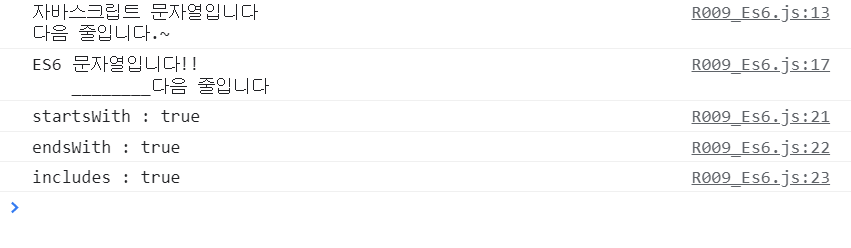
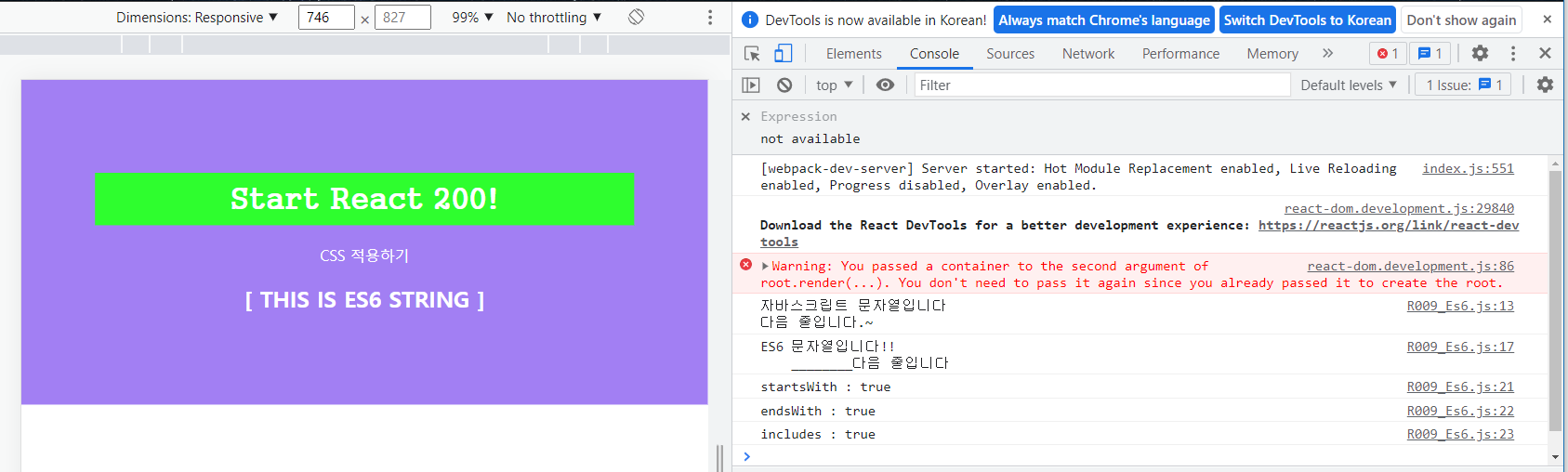
import React, { Component } from 'react';

class R009_Es6 extends Component {

  constructor(props) {
    super(props);
    this.state = {};
  }

  componentDidMount() {
    var jsString1 = ('자바스크립트');
    var jsString2 = ('입니다\n다음 줄입니다.');
    console.log(jsString1+' 문자열' + jsString2+'~');

    var Es6String1 = 'ES6'
    var Es6String2 = '입니다'
    console.log(`${Es6String1} 문자열${Es6String2}!!
    ________다음 줄입니다`);

    var LongString = "ES6에 추가된 String 함수들입니다.";
    console.log('startsWith : ' + LongString.startsWith("ES6에 추가"));
    console.log('endsWith : ' + LongString.endsWith("함수들입니다."));
    console.log('includes : ' + LongString.includes("추가된 String"));
  }

  render() {
    return (
      <h2>[ THIS IS ES6 STRING ]</h2>
    )
  }
}

export default R009_Es6;
R009_es6.js
import React from 'react';
import './App.css';
import LifecycleEx from './R009_Es6.js'   // R008_LifecycleEx.js 임포트

function App() {
  return (
    <div>
      <h1>Start React 200!</h1>
      <p>CSS 적용하기</p>
      <LifecycleEx
        prop_value = 'FromApp.js'
      />
    </div>
  );
}

export default App;
010 var, let, const 사용하기
ES5에서 사용하던 var는 유연한 방식으로 변수를 재선언, 재할당 가능
-> 변수의 사용범위가 불확실, 의도하지 않은 변수값 변경이 발생함.
-> ES6에서는 let, const 추가
R010_Variable.js
import React, { Component } from 'react';

class R010_Variable extends Component {

  constructor(props) {
    super(props);
    this.state = {};
  }

  componentDidMount() {
    var varName = 'react';
    console.log('varName1 : '+varName);
    var varName = '200'; // 'varName' is already defined no-redeclare
    console.log('varName2 : '+varName);

    let letName = 'react'
    console.log('letName1 : '+letName);
    // let letName = '200'
    // parsing error : Identifier 'letName' has already been declared
    letName = 'react200';
    console.log('letName2 : ' + letName );

    const constName = 'react';
    console.log('constName : ' + constName );
    //const constName = '200'
    // Parsing error: Identifier 'constName' has already been declared
    // constName = 'react200'
    // Uncaught TypeError : Assignment to constant variable.
}

  render() {
    return (
      <h2>[ THIS IS Variable ]</h2>
    )
  }
}

export default R010_Variable;import React from 'react';
import './App.css';
import LifecycleEx from './R010_Variable.js'
function App() {
return (
<div>
<h1>Start React 200!</h1>
<p>CSS 적용하기</p>
<LifecycleEx
prop_value = 'FromApp.js'
/>
</div>
);
}
export default App;

| What is React? (0) | 2025.09.22 |
|---|---|
| React project.. (0) | 2023.04.23 |
| React (0) | 2023.04.16 |
| 1. react (0) | 2023.01.16 |
| [37일차] 리액트 200제 (0) | 2022.08.11 |


connect 하면 딱 connect.
disconnect 물고 있으면 안됨,, 동시에 적용할 수 있는 connection이 유한하기 때문에
골고루 나눠쓰려면 끊어서 사용..
동시에 10명은 사용할 수 있는 클라이언트 동시에 적용
쓸 때만 연결하고 폐기하는..
진짜 클라이언트가 다수일 때 10개의 connection을 미리 만들어 두고 mysql이랑 붙어있음
사용할 수 있는 클라이언트가 가져다가 DB연결해서 쓰고 끊고,, 반복
connection pool 최대 허용 컨넥션을 미리 만들어 둔다.
2~4개만 만들어 둔다. 좀 더 필요하면 +2 +2 +2 .. max.. 이미 만들어둔거는 지우지 않음
다른 서비스를 만들어 두지 않는다. 대표적으로 컨넥션 풀을 사용한다.
[Spring] 커넥션 풀(Connection pool)이란?
커넥션 풀(Connection pool)에 대해서 그래도 알고 사용하자. 쉽게 알고 갔으면 좋겠습니다.
linked2ev.github.io
전체가 model 비즈니스 로직에 들어가는 것
모델 부분에 하나의 패키지

controller에서 service service에서 dao부르기
컨트롤러에서 dao 직접 불러도 되나,,? 굳이 서비스를 끼는 이유
/
1. 데이터베이스 쿼리를 바꾼다. X 한시적으로 쓰는 거라 문제가 있다.
다른 곳에서 쓰일 수가 있기 때문에
2. 갖고오는 메소드 X 직접 접근하니깐 MVC가 깨져버린다.
MVC유지보수... MVC 맞게 사용
중간에 서비스를 만들었으면, 리턴에서 x0.9를 해주면된다.
비즈니스로직이 컨트롤러로 못넘어가게...

녹화_2022_08_16_17_23_32_797.mp4
3.91MB
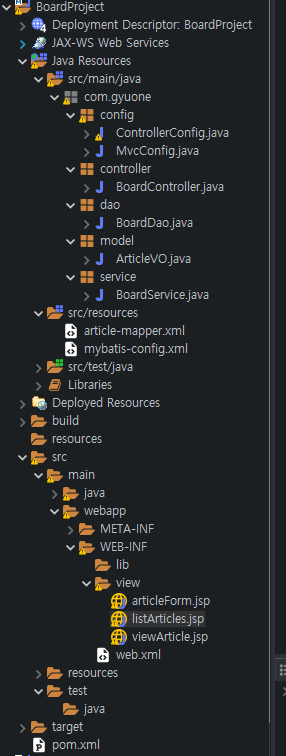
ControllerConfig.java
package com.gyuone.config;

import org.springframework.context.annotation.Bean;
import org.springframework.context.annotation.ComponentScan;
import org.springframework.context.annotation.Configuration;

import com.gyuone.controller.BoardController;
import com.gyuone.dao.BoardDao;
import com.gyuone.model.ArticleVO;
import com.gyuone.service.BoardService;

@Configuration
@ComponentScan(basePackages= {"com.gyuone.config, com.gyuone.service"})
public class ControllerConfig {
	@Bean
	public ArticleVO articleVO() {
		return new ArticleVO();
	}

	@Bean
	public BoardDao boardDao() {
		return new BoardDao();
	}

//	@Bean
//	public BoardService boardService() {
//		return new BoardService();
//	}

	@Bean
	public BoardController boardController() {
		return new BoardController();
	}
}
MvcConfig.java
package com.gyuone.config;

import org.springframework.context.annotation.Configuration;
import org.springframework.web.servlet.config.annotation.DefaultServletHandlerConfigurer;
import org.springframework.web.servlet.config.annotation.EnableWebMvc;
import org.springframework.web.servlet.config.annotation.ViewResolverRegistry;
import org.springframework.web.servlet.config.annotation.WebMvcConfigurer;

@Configuration
@EnableWebMvc
public class MvcConfig implements WebMvcConfigurer{

	@Override
	public void configureDefaultServletHandling(DefaultServletHandlerConfigurer configurer) {
		// TODO Auto-generated method stub
		configurer.enable();
	}

	@Override
	public void configureViewResolvers(ViewResolverRegistry registry) {
		// TODO Auto-generated method stub
		registry.jsp("/WEB-INF/view/", ".jsp"); // .jsp를 알아서 붙여라.
	}


}BoardController.java
package com.gyuone.controller;

import java.util.ArrayList;
import java.util.List;

import org.springframework.beans.factory.annotation.Autowired;
import org.springframework.stereotype.Controller;
import org.springframework.ui.Model;
import org.springframework.web.bind.annotation.RequestMapping;
import org.springframework.web.bind.annotation.RequestMethod;
import org.springframework.web.bind.annotation.RequestParam;
import org.springframework.web.servlet.ModelAndView;

import com.gyuone.model.ArticleVO;
import com.gyuone.service.BoardService;

@Controller
@RequestMapping("/board") // board를 다 받음
public class BoardController {
	@Autowired
	BoardService boardService;
	@Autowired
	ArticleVO articleVo;

	List<ArticleVO> articleList = new ArrayList<ArticleVO>();

	@RequestMapping({"/listArticles","/"}) // 배열로 때림
	public String getArticleList(Model model) {
		articleList = boardService.listArticles();
		model.addAttribute("articleList", articleList);
		return "listArticles";
	}

	@RequestMapping("/newArticle")
	public String writeArticle(Model model) {
		return "articleForm";

	}

	@RequestMapping(value="/addArticle", method=RequestMethod.POST)
	public String addArticle(Model model, @RequestParam(value="title") String title,
			@RequestParam(value="content") String content) {
		articleVo.setTitle(title);
		articleVo.setContents(content);
		articleVo.setWriteId("bit");
		boardService.addArticle(articleVo);

		return "redirect:listArticles"; // client ---> server addArticle로 들어온거.
		// server----> client 요청한거 다 끝냈으니깐 listArticles로 더 불러줄래? ---> listArticles로 다시 불러줌.
	}

	@RequestMapping(value="/viewArticle", method=RequestMethod.GET)
	public ModelAndView viewArticle(@RequestParam(value="articleno") String articleNo) {
		articleVo = boardService.viewArticle(Integer.parseInt(articleNo));
		ModelAndView mv = new ModelAndView();
		mv.setViewName("viewArticle");
		mv.addObject("article", articleVo);

		return mv;
	}
}
BoardDao.java
package com.gyuone.dao;

import java.io.Reader;
import java.util.List;

import org.apache.ibatis.io.Resources;
import org.apache.ibatis.session.SqlSession;
import org.apache.ibatis.session.SqlSessionFactory;
import org.apache.ibatis.session.SqlSessionFactoryBuilder;

import com.gyuone.model.ArticleVO;

public class BoardDao {
	private static SqlSessionFactory sessionFactory = null;

	public static SqlSessionFactory getInstance() {
		if(sessionFactory == null) {
			try {
				String resource = "mybatis-config.xml";
				Reader reader = Resources.getResourceAsReader(resource);
				sessionFactory = new SqlSessionFactoryBuilder().build(reader);
				reader.close();
			} catch (Exception e) {
				// TODO: handle exception
				e.printStackTrace();
			}
		}
		return sessionFactory;
	}

	public List<ArticleVO> selectAllArticles() {
		sessionFactory = getInstance();
		SqlSession session = sessionFactory.openSession();
		List<ArticleVO> articleList = session.selectList("mapper.article.selectAllArticles"); // 리스트 타입으로 던져준다.
		session.close();
		return articleList;
	}

	public void insertNewArticle(ArticleVO article) {
		sessionFactory = getInstance();
		SqlSession session = sessionFactory.openSession();
		session.insert("mapper.article.insertArticle", article);
		session.commit();
//		session.close(); commit을 때리면 알아서 해주기 때문에 close 안해도 된다.
	}

	public ArticleVO selectArticle(int articleNo) {
		sessionFactory = getInstance();
		SqlSession session = sessionFactory.openSession();
		ArticleVO article;
		article = session.selectOne("mapper.article.selectArticle", articleNo);
		session.close();
		return article;
	}

	public void updateArticle(ArticleVO article) {
		sessionFactory = getInstance();
		SqlSession session = sessionFactory.openSession();
		session.update("mapper.article.updateArticle", article);
		session.commit();
	}

	public void deleteArticle(int articleNo) {
		sessionFactory = getInstance();
		SqlSession session = sessionFactory.openSession();
		session.delete("mapper.article.deleteArticle", articleNo);
		session.commit();
	}


}ArticleVO.java
package com.gyuone.model;

public class ArticleVO {
	private int articleNo;
	private String title;
	private String contents;
	private String writeId;
	private String writeDate;

	public ArticleVO() { // value object

	}

	public ArticleVO(int articleNo, String title, String contents, String writeID) {
		super();
		this.articleNo = articleNo;
		this.title = title;
		this.contents = contents;
		this.writeId = writeID; // date는 default라 뺀다.
	}

	public int getArticleNo() {
		return articleNo;
	}

	public void setArticleNo(int articleNo) {
		this.articleNo = articleNo;
	}

	public String getTitle() {
		return title;
	}

	public void setTitle(String title) {
		this.title = title;
	}

	public String getContents() {
		return contents;
	}

	public void setContents(String contents) {
		this.contents = contents;
	}

	public String getWriteId() {
		return writeId;
	}

	public void setWriteId(String writeId) {
		this.writeId = writeId;
	}

	public String getWriteDate() {
		return writeDate;
	}

	public void setWriteDate(String writeDate) {
		this.writeDate = writeDate;
	}


}
BoardService.java
package com.gyuone.service;

import java.util.List;

import org.springframework.beans.factory.annotation.Autowired;
import org.springframework.stereotype.Service;

import com.gyuone.dao.BoardDao;
import com.gyuone.model.ArticleVO;

@Service
public class BoardService {
	@Autowired
	BoardDao boardDao;

	public List<ArticleVO> listArticles(){
		List<ArticleVO> articleList = boardDao.selectAllArticles();
		return articleList;
	}

	public void addArticle(ArticleVO article) {
		boardDao.insertNewArticle(article);
	}

	public ArticleVO viewArticle(int articleNo) {
		ArticleVO article;
		article = boardDao.selectArticle(articleNo);
		return article;
	}
}
article-mapper.xml
<?xml version="1.0" encoding="UTF-8"?>
<!DOCTYPE mapper PUBLIC "-//mybatis.org//DTD Mapper 3.0//EN"
"http://mybatis.org/dtd/mybatis-3-mapper.dtd">

<mapper namespace="mapper.article">
	<resultMap id="articleResult" type="articleVO">
		<result property="articleNo" column="ArticleNO" />
		<result property="title" column="Title" />
		<result property="contents" column="Contents" />
		<result property="writeDate" column="WriteDate" />
		<result property="writeId" column="WriteID" />
	</resultMap>
	<select id="selectAllArticles" resultMap="articleResult">
		<![CDATA[
			select * from noticeboard order by WriteDate desc
		]]>
	</select>
	<select id="selectArticle" resultType="articleVO"
		parameterType="int">
		<![CDATA[
			select * from noticeboard where ArticleNo = #{articleNo}
		]]>
	</select>
	<insert id="insertArticle" parameterType="articleVO">
		<![CDATA[
			insert into noticeboard (Title, Contents, writeDate, WriteID)
			values (#{title}, #{contents}, default, #{writeId})
		]]>
	</insert>
	<update id="updateArticle" parameterType="articleVO">
		<![CDATA[
			update noticeboard set Title= #{title}, Contents=#{contents}
			where ArticleNo=#{articleNo}
		]]>
	</update>
	<delete id="deleteArticle" parameterType="articleVO">
		<![CDATA[
			delete from noticeboard where ArticleNo=#{articleNo}
		]]>
	</delete>
</mapper>
mybatis-config.xml
<?xml version="1.0" encoding="UTF-8"?>
<!DOCTYPE configuration PUBLIC "-//mybatis.org//DTD Config 3.0//EN"
"http://mybatis.org/dtd/mybatis-3-config.dtd">
<configuration>
<typeAliases>
<typeAlias type="com.gyuone.model.ArticleVO"
alias="articleVO" />
</typeAliases>
<environments default="dev">
<environment id="dev">
<transactionManager type="JDBC"></transactionManager>
<dataSource type="POOLED">
<property name="driver" value="com.mysql.cj.jdbc.Driver" />
<property name="url"
value="jdbc:mysql://localhost:3306/board?useUnicode=true&characterEncoding=utf8" />
<property name="username" value="gyuwon" />
<property name="password" value="1234" />
</dataSource>
</environment>
</environments>
<mappers>
<mapper resource="article-mapper.xml" />
</mappers>
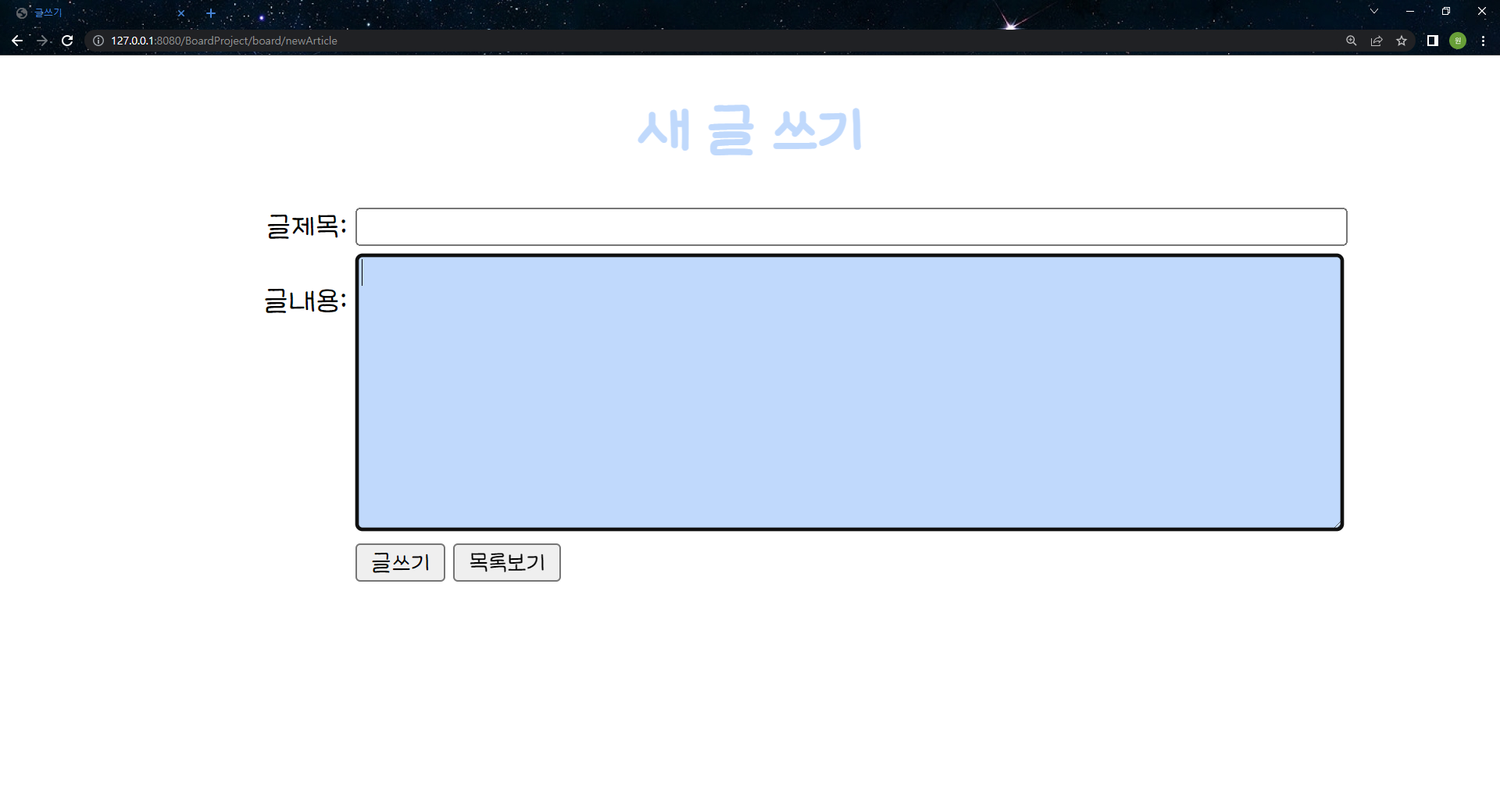
</configuration>└articleForm.jsp
<%@ page language="java" contentType="text/html; charset=UTF-8"
	pageEncoding="UTF-8"%>
<%@ taglib prefix="c" uri="http://java.sun.com/jsp/jstl/core"%>
<c:set var="contextPath" value="${pageContext.request.contextPath}" />
<%
	request.setCharacterEncoding("UTF-8"); // 자바 소스 코드사용
%>
<!DOCTYPE html>
<html>
<head>
<meta charset="UTF-8">
<title>글쓰기</title>
<script>
	function backToList(frm) {
		frm.action="${contextPath}/board/listArticles";
		frm.submit();
	}
</script>
<style>
.class-caption {
	width: 100px;
}

.class-content {
	width: 500px;
}

@font-face {
	font-family: 'LeeSeoyun';
	src:
		url('https://cdn.jsdelivr.net/gh/projectnoonnu/noonfonts_2202-2@1.0/LeeSeoyun.woff')
		format('woff');
	font-weight: normal;
	font-style: normal;
}

* {
	font-family: 'LeeSeoyun';
}

input:focus { background-color: #c0d9fc; }
textarea:focus { background-color: #c0d9fc; }


</style>
</head>
<body>
	<h1 style="text-align: center; color:#c0d9fc;">새 글 쓰기</h1>
	<form name="articleForm" method="post" action="${contextPath}/board/addArticle">
		<table boarder="0" align="center">
			<tbody>
				<tr>
					<td align="right" class="class-caption">글제목:</td>
					<td colspan="2">
						<input type="text" maxlength="100" name="title" class="class-content" />
					</td>
				</tr>
				<tr>
					<td align="right" valign="top" class="class-caption"><br>글내용:</td>
					<td colspan="2">
						<textarea name="content" rows="10" maxlength="2000" class="class-content" ></textarea>
					</td>
				</tr>
				<tr>
					<td align="right"></td>
					<td colspan="2">
						<input type="submit" value="글쓰기" />
						<input type="button" value="목록보기" onclick = "backToList(articleForm)" />
					</td>
				</tr>
			</tbody>
		</table>
	</form>
</body>
</html>
└listArticles.jsp
<%@ page language="java" contentType="text/html; charset=UTF-8"
	pageEncoding="UTF-8"%>
<%@ taglib prefix="c" uri="http://java.sun.com/jsp/jstl/core"%>
<c:set var="contextPath" value="${pageContext.request.contextPath}" />
<%
request.setCharacterEncoding("UTF-8"); // 자바 소스 코드사용
%>
<!DOCTYPE html>
<html>
<head>
<meta charset="UTF-8">
<title>글 목록</title>
<style>
@font-face {
	font-family: 'LeeSeoyun';
	src:
		url('https://cdn.jsdelivr.net/gh/projectnoonnu/noonfonts_2202-2@1.0/LeeSeoyun.woff')
		format('woff');
	font-weight: normal;
	font-style: normal;
}

* {
	font-family: 'LeeSeoyun';
}

.cls1 {
	text-decoration: none;
}

.cls2 {
	text-align: center;
	font-size: 30px;
	display: block;
}

a:hover {
	color: #153acf;
}

button:hover{
	background-color: #c0d9fc;
}

/* width */
::-webkit-scrollbar {
	width: 25px;
}

/* Track */
::-webkit-scrollbar-track {
	box-shadow: inset 0 0 3px #c0d9fc;
	border-radius: 5px;
}

/* Handle */
::-webkit-scrollbar-thumb {
	background: #c0d9fc;;
	border-radius: 5px;
}
</style>
</head>
<body>
	<h1 style="text-align: center; color: #c0d9fc;">글 목록</h1>
	<br><br>
	<table align="center" border="1" width="80%">
		<thead>
			<tr height="10" align="center" bgcolor="#c0d9fc">
				<th>글 번호</th>
				<th>작성자</th>
				<th>제목</th>
				<th>작성일</th>
			</tr>
		</thead>
		<c:choose>
			<c:when test="${articleList == null}">
				<tbody>
					<tr height="10">
						<td colspan="4">
							<p align="center">
								<b><span style="font-size: 9pt;">등록된 글이 없습니다.</span></b>
							</p>
						</td>
					</tr>
				</tbody>
			</c:when>
			<c:otherwise>
				<!-- core 라이브러리 -->
				<tbody>
					<c:forEach var="article" items="${articleList}"
						varStatus="articleNum">
						<tr align="center">
							<td width="5%">${articleNum.count}</td>
							<td width="10%">${article.writeId}</td>
							<td align="left" width="35%"><span
								style="padding-right: 30px"></span> <a class="cls1"
								href="${contextPath}/board/viewArticle?articleno=${article.articleNo}">
									${article.title} </a></td>
							<td width="10%">${article.writeDate}</td>
						</tr>
					</c:forEach>
				</tbody>
			</c:otherwise>
		</c:choose>
	</table>
	<br>
	<a class="cls1" href="${contextPath}/board/newArticle">
		<center>
			<button>
				<span class="clas2">글쓰기</span>
			</button>
		</center>
	</a>
</body>
</html>
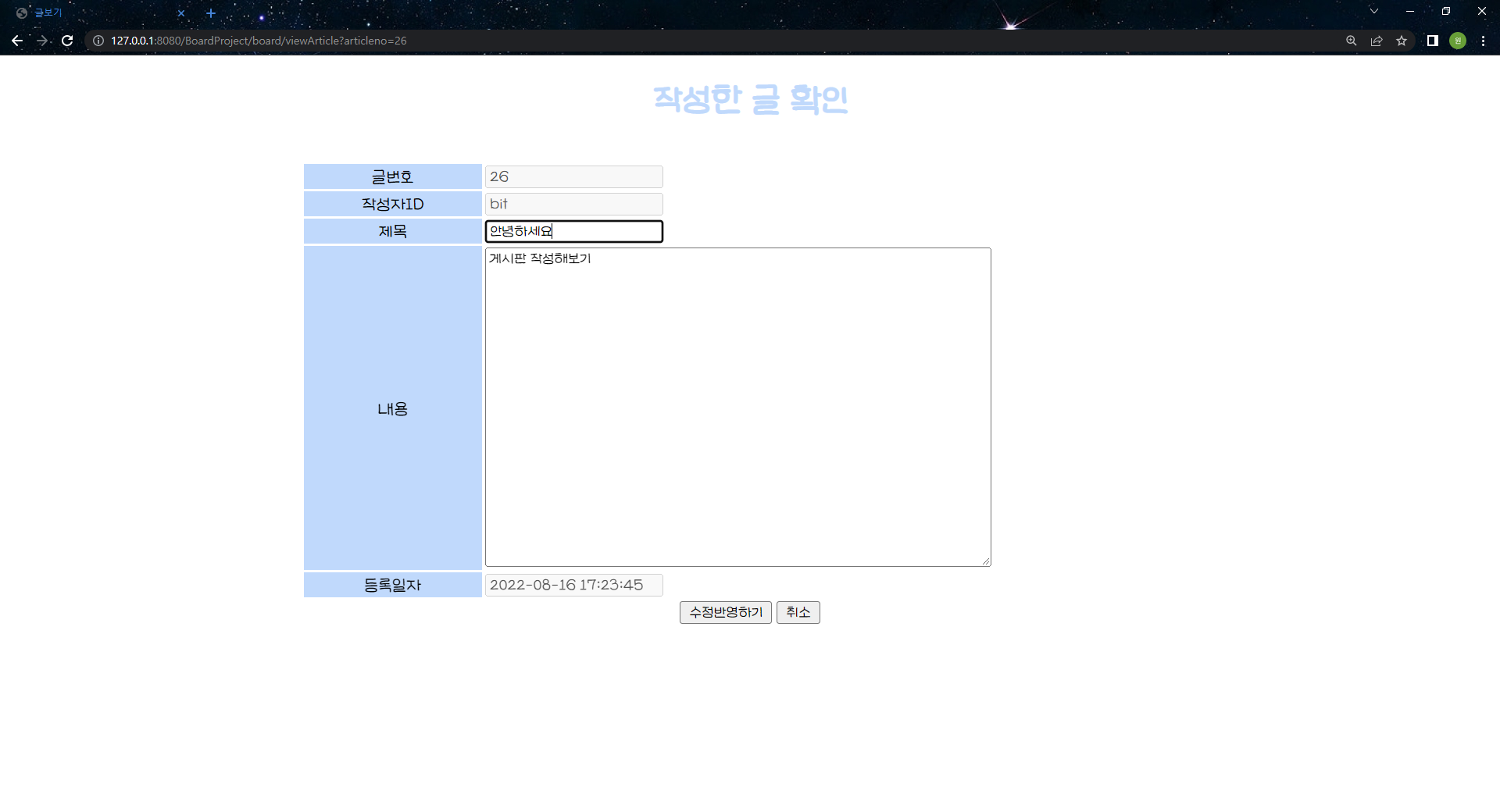
└viewArticle.jsp
<%@ page language="java" contentType="text/html; charset=UTF-8"
	pageEncoding="UTF-8"%>
<%@ taglib prefix="c" uri="http://java.sun.com/jsp/jstl/core"%>
<c:set var="contextPath" value="${pageContext.request.contextPath}" />
<%
	request.setCharacterEncoding("UTF-8"); // 자바 소스 코드사용
%>
<!DOCTYPE html>
<html>
<head>
<meta charset="UTF-8">
<title>글보기</title>
<script>
	function backToList(frm) {
		frm.action="${contextPath}/board/listArticles";
		frm.submit();
  	}

	function fn_enable(){
		document.querySelector("#i_title").disabled = false;
		document.querySelector("#i_content").disabled = false;
		document.querySelector("#tr_btn_modify").style.display = "table-row";
		document.querySelector("#tr_btn").style.display = "none";
	}


</script>
<style>
#tr_btn_modify {
	display: none;
}

@font-face {
	font-family: 'LeeSeoyun';
	src:
		url('https://cdn.jsdelivr.net/gh/projectnoonnu/noonfonts_2202-2@1.0/LeeSeoyun.woff')
		format('woff');
	font-weight: normal;
	font-style: normal;
}

* {
	font-family: 'LeeSeoyun';
}

		/* width */
		::-webkit-scrollbar {
			width: 25px;
		}

		/* Track */
		::-webkit-scrollbar-track {
			box-shadow: inset 0 0 3px #c0d9fc;
			border-radius: 5px;
		}

		/* Handle */
		::-webkit-scrollbar-thumb {
			background: #c0d9fc;
			;
			border-radius: 5px;
		}

</style>
</head>
<body>
	<h1 style="text-align: center; color: #c0d9fc;">작성한 글 확인</h1>
	<br>
	<form name="frmArticle" method="post" action="">
		<table border="0" align="center">
			<tbody>
				<tr>
					<td width="150" align="center" bgcolor="#c0d9fc">글번호</td>
					<td><input name="articleNo" type="text"
						value="${article.articleNo}" disabled /></td>
				</tr>
				<tr>
					<td width="150" align="center" bgcolor="#c0d9fc">작성자ID</td>
					<td><input name="writer" type="text"
						value="${article.writeId}" disabled /></td>
				</tr>
				<tr>
					<td width="150" align="center" bgcolor="#c0d9fc">제목</td>
					<td><input name="title" type="text" value="${article.title}"
						id="i_title" disabled /></td>
				</tr>
				<tr>
					<td width="150" align="center" bgcolor="#c0d9fc">내용</td>
					<td><textarea name="content" rows="20" cols="60"
							id="i_content" disabled>${article.contents}</textarea></td>
				</tr>
				<tr>
					<td width="20%" align="center" bgcolor="#c0d9fc">등록일자</td>
					<td><input type="text" value="${article.writeDate}" disabled /></td>
				</tr>
				<tr id="tr_btn_modify">
					<td colspan="2" align="center"><input type="button"
						value="수정반영하기" onclick="fn_modify_article(frmArticle)" /> <input
						type="button" value="취소" onclick="backToList(frmArticle)" /></td>
				</tr>
				<tr id="tr_btn">
					<td colspan="2" align="center"><br> <input type="button"
						value="수정하기" onclick="fn_enable()" /> <input
						type="button" value="삭제하기"
						onclick="fn_remove_article('${contextPath}/board/removeArticle', ${article.articleNo} })" />
						<input type="button" value="리스트로 돌아가기"
						onclick="backToList(frmArticle)" /></td>
				</tr>
			</tbody>
		</table>
	</form>
</body>
</html>
└web.xml
<?xml version="1.0" encoding="UTF-8"?>
<web-app xmlns:xsi="http://www.w3.org/2001/XMLSchema-instance" xmlns="http://xmlns.jcp.org/xml/ns/javaee" xsi:schemaLocation="http://xmlns.jcp.org/xml/ns/javaee http://xmlns.jcp.org/xml/ns/javaee/web-app_4_0.xsd" id="WebApp_ID" version="4.0">
  <display-name>BoardProject</display-name>
  <welcome-file-list>
    <welcome-file>index.html</welcome-file>
  </welcome-file-list>
  <filter>
		<filter-name>encodingFilter</filter-name>
		<filter-class>org.springframework.web.filter.CharacterEncodingFilter</filter-class>
		<init-param>
			<param-name>encoding</param-name>
			<param-value>UTF-8</param-value>
		</init-param>
	</filter>
	<filter-mapping>
		<filter-name>encodingFilter</filter-name>
		<url-pattern>/*</url-pattern>
	</filter-mapping>
	<servlet>
		<servlet-name>dispatcher</servlet-name>
		<servlet-class>
			org.springframework.web.servlet.DispatcherServlet
		</servlet-class>
		<init-param>
			<param-name>contextClass</param-name>
			<param-value>
				org.springframework.web.context.support.AnnotationConfigWebApplicationContext
			</param-value>
		</init-param>
		<init-param>
			<param-name>contextConfigLocation</param-name>
			<param-value>
				com.gyuone.config.MvcConfig
				com.gyuone.config.ControllerConfig
			</param-value>
		</init-param>
		<load-on-startup>1</load-on-startup>
	</servlet>
	<servlet-mapping>
		<servlet-name>dispatcher</servlet-name>
		<url-pattern>/</url-pattern>
	</servlet-mapping>
</web-app>
pom.xml
<project xmlns="http://maven.apache.org/POM/4.0.0" xmlns:xsi="http://www.w3.org/2001/XMLSchema-instance" xsi:schemaLocation="http://maven.apache.org/POM/4.0.0 https://maven.apache.org/xsd/maven-4.0.0.xsd">
	<modelVersion>4.0.0</modelVersion>
	<groupId>com.gyuone</groupId>
	<artifactId>BoardProject</artifactId>
	<version>0.0.1-SNAPSHOT</version>
	<packaging>war</packaging>
	<build>
		<plugins>
			<plugin>
				<artifactId>maven-compiler-plugin</artifactId>
				<version>3.8.1</version>
				<configuration>
					<release>11</release>
				</configuration>
			</plugin>
			<plugin>
				<artifactId>maven-war-plugin</artifactId>
				<version>3.2.3</version>
			</plugin>
		</plugins>
	</build>
	<dependencies>
		<!-- https://mvnrepository.com/artifact/javax.servlet/javax.servlet-api -->
		<dependency>
			<groupId>javax.servlet</groupId>
			<artifactId>javax.servlet-api</artifactId>
			<version>4.0.1</version>
			<scope>provided</scope>
		</dependency>
		<!-- https://mvnrepository.com/artifact/javax.servlet.jsp/javax.servlet.jsp-api -->
		<dependency>
			<groupId>javax.servlet.jsp</groupId>
			<artifactId>javax.servlet.jsp-api</artifactId>
			<version>2.3.3</version>
			<scope>provided</scope>
		</dependency>
		<!-- https://mvnrepository.com/artifact/javax.servlet/jstl -->
		<dependency>
			<groupId>javax.servlet</groupId>
			<artifactId>jstl</artifactId>
			<version>1.2</version>
		</dependency>
		<!-- https://mvnrepository.com/artifact/org.springframework/spring-webmvc -->
		<dependency>
			<groupId>org.springframework</groupId>
			<artifactId>spring-webmvc</artifactId>
			<version>5.3.22</version>
		</dependency>

		<!-- https://mvnrepository.com/artifact/mysql/mysql-connector-java -->
		<dependency>
			<groupId>mysql</groupId>
			<artifactId>mysql-connector-java</artifactId>
			<version>8.0.29</version>
		</dependency>
		<!-- https://mvnrepository.com/artifact/org.mybatis/mybatis -->
		<dependency>
			<groupId>org.mybatis</groupId>
			<artifactId>mybatis</artifactId>
			<version>3.5.10</version>
		</dependency>

		<!-- https://mvnrepository.com/artifact/org.mybatis/mybatis-spring -->
		<dependency>
			<groupId>org.mybatis</groupId>
			<artifactId>mybatis-spring</artifactId>
			<version>2.0.7</version>
		</dependency>

	</dependencies>

</project>




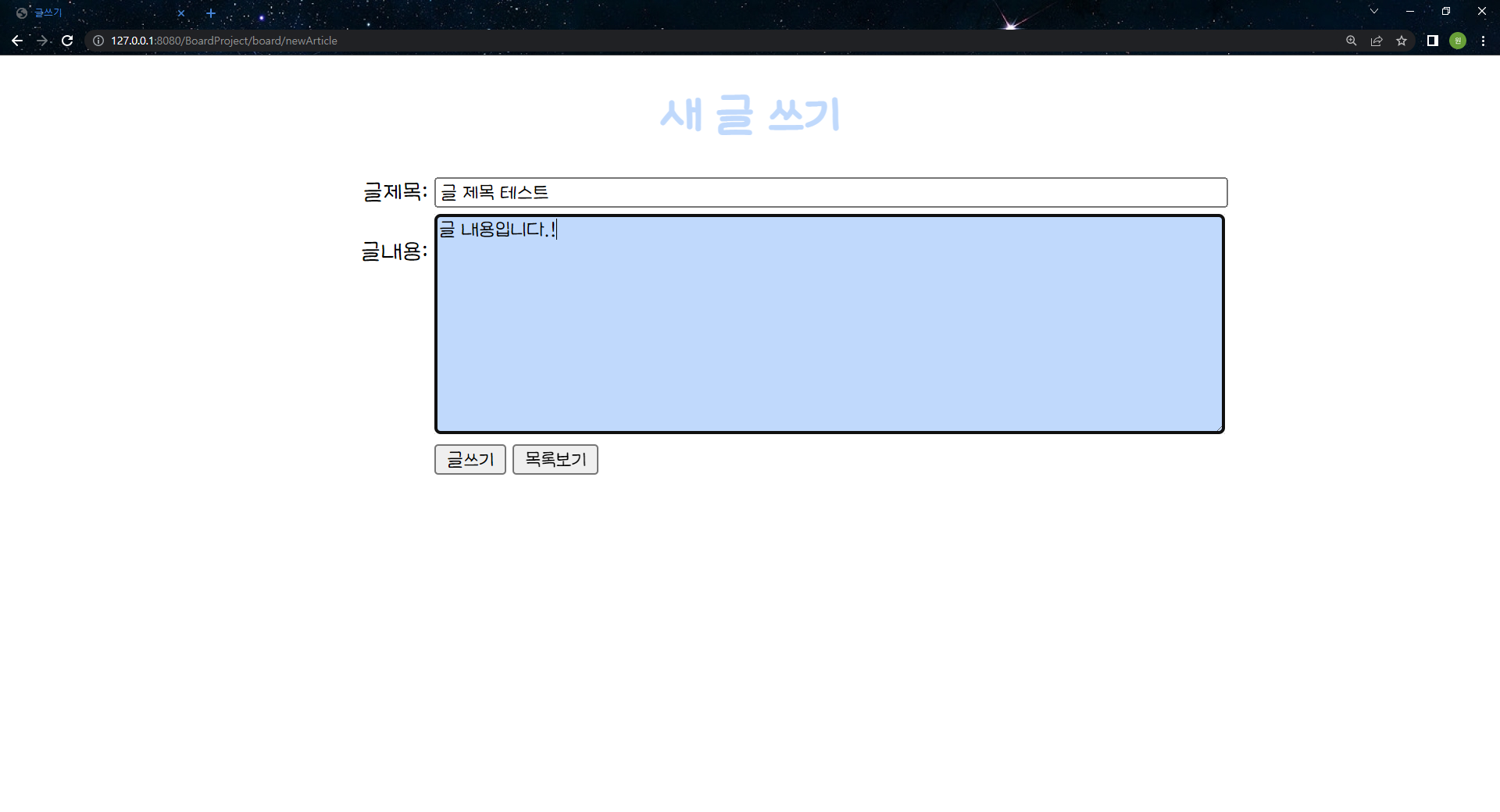

| [40일차] logback (0) | 2022.08.17 |
|---|---|
| [40일차] 게시판 만들기(3) delete. update 추가 🌀 최종 게시판 만들기 (0) | 2022.08.17 |
| [38일차] 게시판 만들기 (0) | 2022.08.12 |
| [38일차] FirstSpring (0) | 2022.08.12 |
| [38일차] AOP/ aop concert project (0) | 2022.08.12 |
mysql
local 계정 ctrl + enter

root 계정

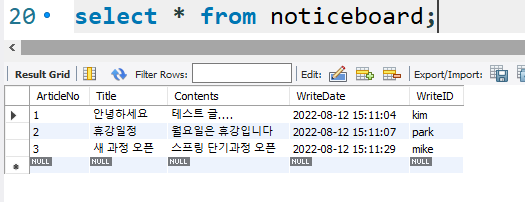
추추가
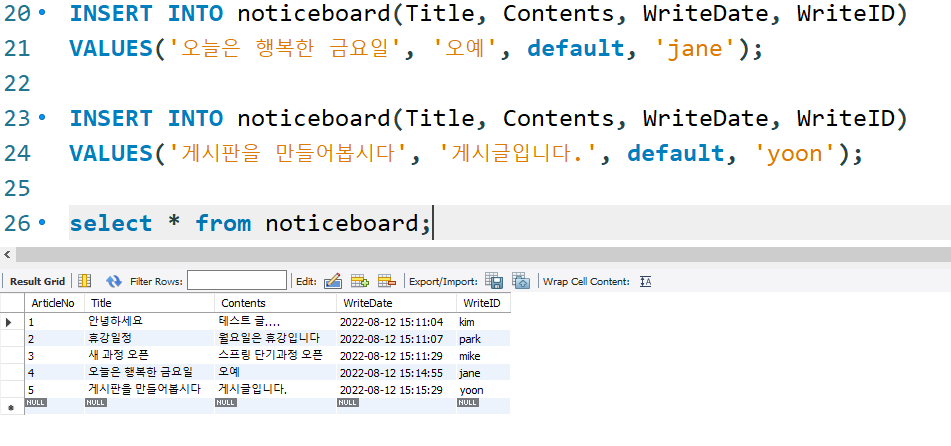
mysql 버전 확인 8.0.29
Persistence Framework
지속성 프레임워크
지속성 프레임워크(Persistence Framework)는 데이터의 저장, 조회, 변경, 삭제를 다루는 클래스 및 설정 파일들의 집합이다. 지속성 프레임워크를 사용하면 JDBC 프로그래밍의 복잡함이나 번거로움 없이 간단한 작업만으로 데이터베이스와 연동되는 시스템을 빠르게 개발할 수 있으며 안정적인 구동도 보장한다.
ID하고 sql 매핑해서 쓰는 거 . 대표적으로 MyBatis가 있다. 우리는 이것을 쓸 것
요즘 각광받는 방법. 데이터베이스에 하나의 레코드를 VO 클래스 처럼 하나의 객체로 들고온다. 사용자는 쿼리문을 쓰는게 아니라 객체의 setter getter를 사용한다. 프로그래머 입장에서는 쿼리문을 전혀 사용하지 않는다. 구조로는 DB가 있으면 ORM이 존재하고 소스코드에서 new하고 객체 만들고 추가 메서드만 모델에 집어 넣은 상태에서 중간에 쿼리문으로 바꾼다. 지가 알아서 해석해서 가져다가 준다. 코드상에서는 sql이 안들어간다. 이렇게 하면 장점이 데이터베이스를 바꾸면 ORM이 맡은 부분만 설정하면 된다. JPA java pasistence API .. 사용방법을 주장. JPA 구현한 대표적인게 Hibenate가 있다. 마찬가지로 스프링은 spring - data - jpa 가 있다.


https://mvnrepository.com/artifact/org.mybatis/mybatis-spring/2.0.7
https://mvnrepository.com/artifact/org.mybatis/mybatis/3.5.10
pom.xml
<project xmlns="http://maven.apache.org/POM/4.0.0" xmlns:xsi="http://www.w3.org/2001/XMLSchema-instance" xsi:schemaLocation="http://maven.apache.org/POM/4.0.0 https://maven.apache.org/xsd/maven-4.0.0.xsd">
	<modelVersion>4.0.0</modelVersion>
	<groupId>com.gyuone</groupId>
	<artifactId>BoardProject</artifactId>
	<version>0.0.1-SNAPSHOT</version>
	<packaging>war</packaging>
	<build>
		<plugins>
			<plugin>
				<artifactId>maven-compiler-plugin</artifactId>
				<version>3.8.1</version>
				<configuration>
					<release>11</release>
				</configuration>
			</plugin>
			<plugin>
				<artifactId>maven-war-plugin</artifactId>
				<version>3.2.3</version>
			</plugin>
		</plugins>
	</build>
	<dependencies>
		<!-- https://mvnrepository.com/artifact/javax.servlet/javax.servlet-api -->
		<dependency>
			<groupId>javax.servlet</groupId>
			<artifactId>javax.servlet-api</artifactId>
			<version>4.0.1</version>
			<scope>provided</scope>
		</dependency>
		<!-- https://mvnrepository.com/artifact/javax.servlet.jsp/javax.servlet.jsp-api -->
		<dependency>
			<groupId>javax.servlet.jsp</groupId>
			<artifactId>javax.servlet.jsp-api</artifactId>
			<version>2.3.3</version>
			<scope>provided</scope>
		</dependency>
		<!-- https://mvnrepository.com/artifact/javax.servlet/jstl -->
		<dependency>
			<groupId>javax.servlet</groupId>
			<artifactId>jstl</artifactId>
			<version>1.2</version>
		</dependency>
		<!-- https://mvnrepository.com/artifact/org.springframework/spring-webmvc -->
		<dependency>
			<groupId>org.springframework</groupId>
			<artifactId>spring-webmvc</artifactId>
			<version>5.3.22</version>
		</dependency>

		<!-- https://mvnrepository.com/artifact/mysql/mysql-connector-java -->
		<dependency>
			<groupId>mysql</groupId>
			<artifactId>mysql-connector-java</artifactId>
			<version>8.0.29</version>
		</dependency>
		<!-- https://mvnrepository.com/artifact/org.mybatis/mybatis -->
		<dependency>
			<groupId>org.mybatis</groupId>
			<artifactId>mybatis</artifactId>
			<version>3.5.10</version>
		</dependency>

		<!-- https://mvnrepository.com/artifact/org.mybatis/mybatis-spring -->
		<dependency>
			<groupId>org.mybatis</groupId>
			<artifactId>mybatis-spring</artifactId>
			<version>2.0.7</version>
		</dependency>

	</dependencies>

</project>
| [40일차] 게시판 만들기(3) delete. update 추가 🌀 최종 게시판 만들기 (0) | 2022.08.17 |
|---|---|
| [39일차] 게시판 만들기 (2) (0) | 2022.08.16 |
| [38일차] FirstSpring (0) | 2022.08.12 |
| [38일차] AOP/ aop concert project (0) | 2022.08.12 |
| [37일차] AutoDi (0) | 2022.08.11 |

Spring MVC 만들기 위한... web application
일부일 뿐이당..


war jar은 클래스만 때려박으면 되는데 war는 html, 이미지 이런걸 넣어야하기때문에 안된답!
dependency maven 끌고 오기!!
https://mvnrepository.com/artifact/javax.servlet/javax.servlet-api/4.0.1
https://mvnrepository.com/artifact/javax.servlet.jsp/javax.servlet.jsp-api
https://mvnrepository.com/artifact/javax.servlet/jstl/1.2
https://mvnrepository.com/artifact/org.springframework/spring-webmvc/5.3.22
FirstSpring/pom.xml
<project xmlns="http://maven.apache.org/POM/4.0.0" xmlns:xsi="http://www.w3.org/2001/XMLSchema-instance" xsi:schemaLocation="http://maven.apache.org/POM/4.0.0 https://maven.apache.org/xsd/maven-4.0.0.xsd">
	<modelVersion>4.0.0</modelVersion>
	<groupId>com.gyuone</groupId>
	<artifactId>FirstSpring</artifactId>
	<version>0.0.1-SNAPSHOT</version>
	<packaging>war</packaging>
	<build>
		<plugins>
			<plugin>
				<artifactId>maven-compiler-plugin</artifactId>
				<version>3.8.1</version>
				<configuration>
					<release>11</release>
				</configuration>
			</plugin>
			<plugin>
				<artifactId>maven-war-plugin</artifactId>
				<version>3.2.3</version>
			</plugin>
		</plugins>
	</build>
	<dependencies>
		<!-- https://mvnrepository.com/artifact/javax.servlet/javax.servlet-api -->
		<dependency>
			<groupId>javax.servlet</groupId>
			<artifactId>javax.servlet-api</artifactId>
			<version>4.0.1</version>
			<scope>provided</scope>
		</dependency>
		<!-- https://mvnrepository.com/artifact/javax.servlet.jsp/javax.servlet.jsp-api -->
		<dependency>
			<groupId>javax.servlet.jsp</groupId>
			<artifactId>javax.servlet.jsp-api</artifactId>
			<version>2.3.3</version>
			<scope>provided</scope>
		</dependency>
		<!-- https://mvnrepository.com/artifact/javax.servlet/jstl -->
		<dependency>
			<groupId>javax.servlet</groupId>
			<artifactId>jstl</artifactId>
			<version>1.2</version>
		</dependency>
		<!-- https://mvnrepository.com/artifact/org.springframework/spring-webmvc -->
		<dependency>
			<groupId>org.springframework</groupId>
			<artifactId>spring-webmvc</artifactId>
			<version>5.3.22</version>
		</dependency>
	</dependencies>
</project>

보안 때문에 WEB-INF에 만들었다.
원래는 webapp 안에 넣었는데 보안상의 이유로 WEB-INF 안에 넣어야한다.
클라이언트로부터 요청받고 주는 컨트롤
적당한 모델 쪽에 호출함
비즈니스 로직이 들어있는 모델
사용자에게 뿌려주는게 뷰
결과값이 나오면 컨트롤러에서는
뷰에서 jsp에 끄집어다가 결과값 구한 값들을 jsp에 다 가져서 client가 던져줌.
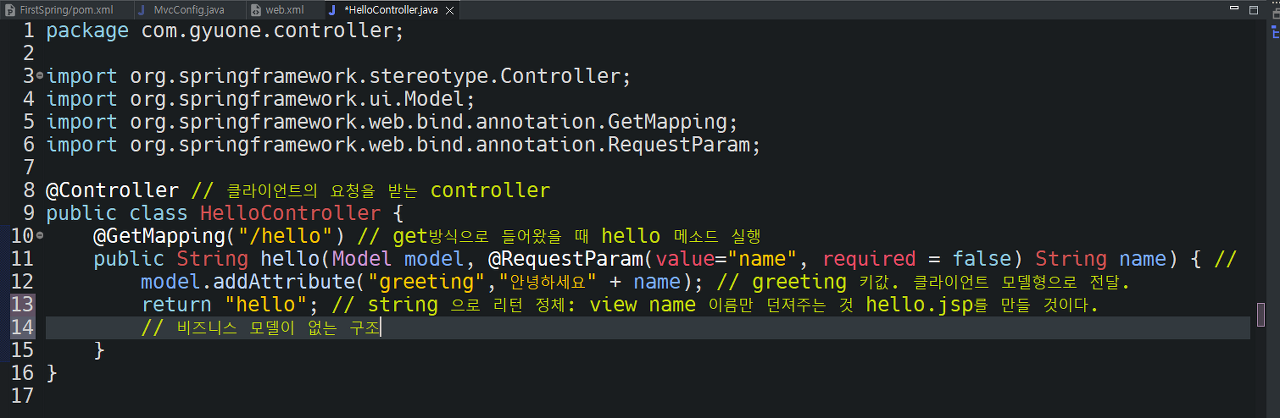
web.xml
<?xml version="1.0" encoding="UTF-8"?>
<web-app xmlns:xsi="http://www.w3.org/2001/XMLSchema-instance"
	xmlns="http://xmlns.jcp.org/xml/ns/javaee"
	xsi:schemaLocation="http://xmlns.jcp.org/xml/ns/javaee http://xmlns.jcp.org/xml/ns/javaee/web-app_4_0.xsd"
	id="WebApp_ID" version="4.0">
	<display-name>FirstSpring</display-name>
	<welcome-file-list>
		<welcome-file>index.html</welcome-file>
	</welcome-file-list>
	<filter>
		<filter-name>encodingFilter</filter-name>
		<filter-class>org.springframework.web.filter.CharacterEncodingFilter</filter-class>
		<init-param>
			<param-name>encoding</param-name>
			<param-value>UTF-8</param-value>
		</init-param>
	</filter>
	<filter-mapping>
		<filter-name>encodingFilter</filter-name>
		<url-pattern>/*</url-pattern>
	</filter-mapping>
	<servlet>
		<servlet-name>dispatcher</servlet-name>
		<servlet-class>org.springframework.web.servlet.DispatcherServlet</servlet-class>
		<init-param>
			<param-name>contextClass</param-name>
			<param-value>
				org.sprinframework.web.context.support.AnnotationConfigWebApplicationContext
			</param-value>
		</init-param>
		<init-param>
			<param-name>contextConfigLocation</param-name>
			<param-value>
				com.gyuone.config.MvcConfig
				com.gyuone.config.ControllerConfig
			</param-value>
		</init-param>
		<load-on-startup>1</load-on-startup>
	</servlet>
</web-app>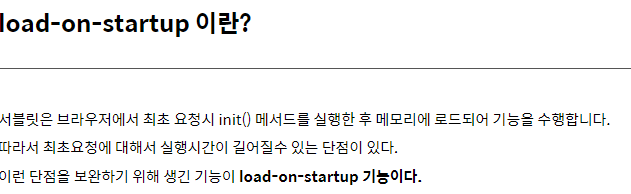
톰캣파일 구동하라 load on startup

그대로 톰캣 상태로 전달 Dispatcher Servelt 이 받는 것 Dispatcher servelt이 어떤 요청인지 판단한다. 컨트롤러로 보낸다.
모델을 안만들었지만, 컨트롤러 메서드 안에서 모델로 접근 비즈니스 로직이 들어감. 모델이 데이터베이스까지 접근한다. 그 결과를 다시 준다.

127.0.0.1:8080/FirstSpring/hello?name=kim

접근이 안된다. view 파일 만들어서 하는 이유
NGINX를 설치하고 톰캣으로 집어 넣어 버리는 ..
이클립스 서버 죽이고 시작할 것 충돌주의 !
spring으로 이름 바꾸기
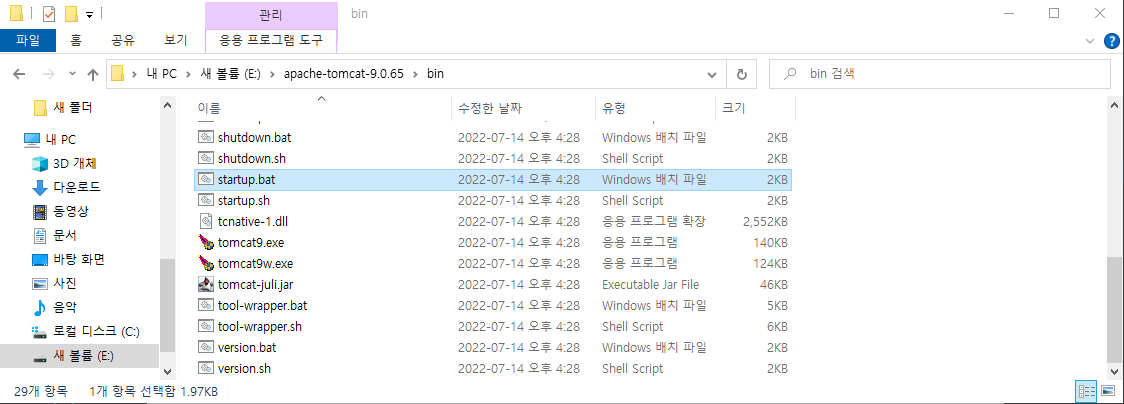
E:\apache-tomcat-9.0.65\bin startup.bat 실행

spring으로 파일이 생성된다.


package com.gyuone.config;

import org.springframework.context.annotation.Bean;
import org.springframework.context.annotation.Configuration;

import com.gyuone.controller.HelloController;

@Configuration // Spring용 설정 클래스
public class ControllerConfig {
	@Bean
	public HelloController helloController() {
		return new HelloController();
	}
}
package com.gyuone.config;

import org.springframework.context.annotation.Configuration;
import org.springframework.web.servlet.config.annotation.DefaultServletHandlerConfigurer;
import org.springframework.web.servlet.config.annotation.EnableWebMvc;
import org.springframework.web.servlet.config.annotation.ViewResolverRegistry;
import org.springframework.web.servlet.config.annotation.WebMvcConfigurer;

@Configuration
@EnableWebMvc
public class MvcConfig implements WebMvcConfigurer{

	@Override
	public void configureDefaultServletHandling(DefaultServletHandlerConfigurer configurer) {
		// TODO Auto-generated method stub
		configurer.enable();
	}

	@Override
	public void configureViewResolvers(ViewResolverRegistry registry) {
		// TODO Auto-generated method stub
		registry.jsp("/WEB-INF/view/", ".jsp"); // .jsp를 알아서 붙여라.
	}


}
package com.gyuone.controller;

import org.springframework.stereotype.Controller;
import org.springframework.ui.Model;
import org.springframework.web.bind.annotation.GetMapping;
import org.springframework.web.bind.annotation.RequestParam;

@Controller // 클라이언트의 요청을 받는 controller
public class HelloController {
	@GetMapping("/hello") // get방식으로 들어왔을 때 hello 메소드 실행
	public String hello(Model model, @RequestParam(value="name", required = false) String name) { // RequestParam 클라이언트에서 name이라는 항목으로 값을 전달한다.
		model.addAttribute("greeting","안녕하세요, " + name); // greeting 키값. 클라이언트 모델형으로 전달.
		return "hello"; // string 으로 리턴 정체: view name 이름만 던져주는 것 hello.jsp를 만들 것이다.
		// 비즈니스 모델이 없는 구조
	}
}
<%@ page language="java" contentType="text/html; charset=UTF-8"
    pageEncoding="UTF-8"%>
<!DOCTYPE html>
<html>
<head>
<meta charset="UTF-8">
<title>Hello Page</title>
</head>
<body>
	인사말 : ${greeting}
</body>
</html>
FirstSpring/hello?name=kim을 입력하면..

| [39일차] 게시판 만들기 (2) (0) | 2022.08.16 |
|---|---|
| [38일차] 게시판 만들기 (0) | 2022.08.12 |
| [38일차] AOP/ aop concert project (0) | 2022.08.12 |
| [37일차] AutoDi (0) | 2022.08.11 |
| [37일차] dISample project (0) | 2022.08.11 |